
ⓘ Screenshot: Notebookcheck
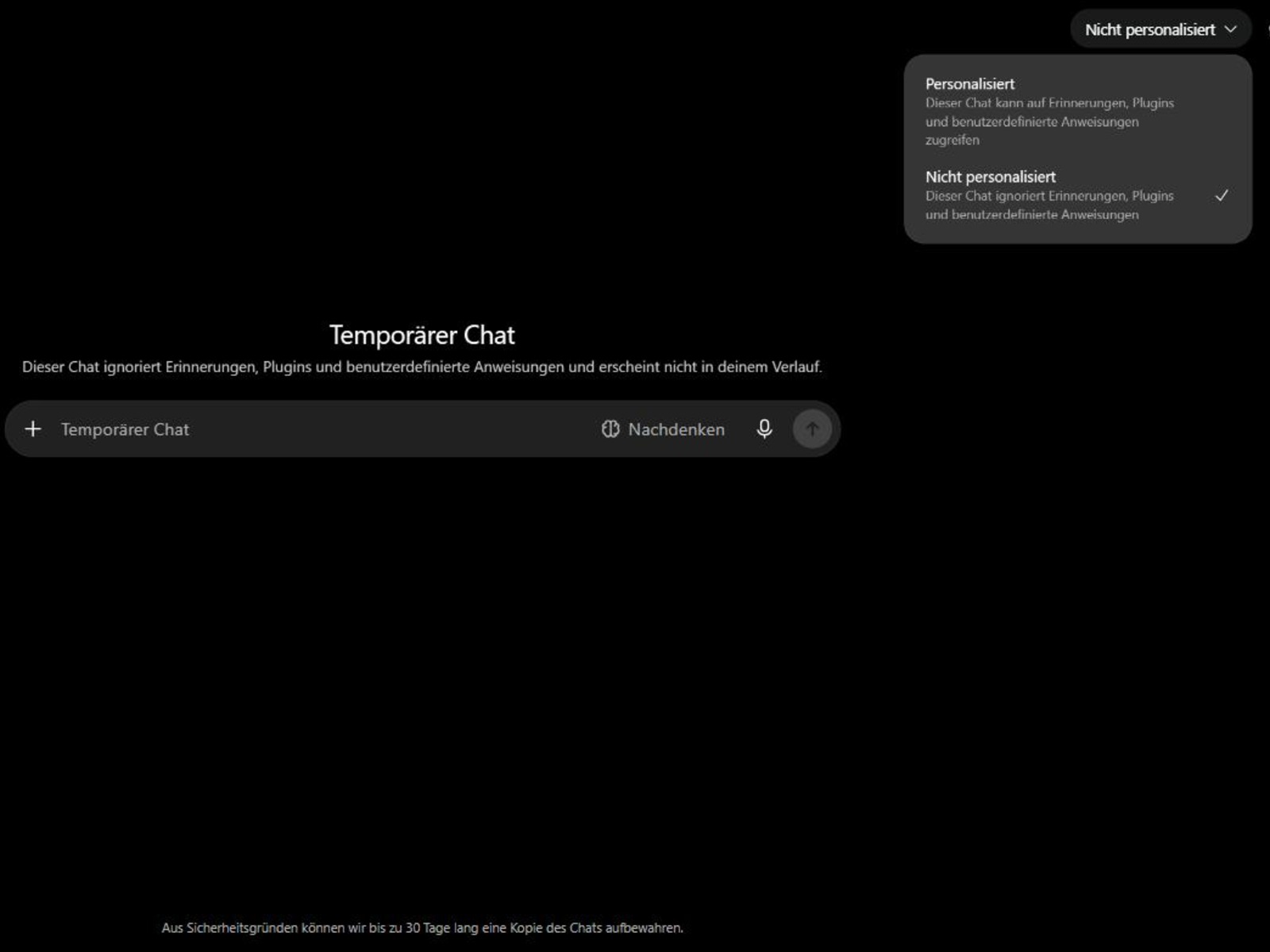
Since 27 August 2026, a temporary chat in ChatGPT lets you decide at the start whether it may reach your memories, plugins and custom instructions. The screenshot shows the German interface.
Temporary chat was the mode in which ChatGPT knew nothing about you. Since 27 August there is a choice at the top right of the window. Personalized, and the chat reaches your memories, plugins and custom instructions. Save it, and it becomes a regular chat that follows your training setting.
People who switch to a temporary chat in ChatGPT usually do it for one reason, because this conversation is meant to leave no trace. Since 27 August 2026 that only holds as long as you click nothing else at the start. A small menu now sits in the top right corner of the empty window, and it holds a choice between two states.
The default entry stays “Non-personalized”, so nothing changes for anyone who ignores the menu. OpenAI describes that state in its FAQ with the line that temporary chats start non-personalized by default and use no memory, custom instructions or plugins. The second entry is called “Personalized” and turns this around. A personalized temporary chat can reach your saved memories, your connected plugins and the instructions you once stored for every conversation.
The decision falls before the first sentence. OpenAI writes that personalization can be set only when you start a temporary chat and cannot be changed after the conversation begins.
Saving turns a temporary chat into a regular one
The other direction is new as well. If a temporary conversation turns out to be useful, it can be moved into your chat history afterwards, and its special status ends there. From that point your account settings apply, including the one that decides whether your content improves the models. With memory enabled, a saved chat can also shape later answers. What the training toggle does not switch off is something we wrote up last week.
One limit remains, because a personalized temporary chat reads existing memories yet creates no new ones while it stays temporary.
What the default mode leaves open
The FAQ carries a sentence many readers skip. For safety purposes OpenAI may still keep a copy of a temporary chat for up to 30 days, and that holds no matter which entry you pick in the menu. Safety features are carved out on top of that. They may draw on limited context from earlier conversations in rare, high-risk situations so the answer fits the moment better.
The release notes name Plus, Pro and Business. A look at a free account in Germany on 29 August showed the menu anyway, with both options in place. Anyone going through their account settings should also check which sign-ins ChatGPT keeps open for them.

I write about IT security and artificial intelligence. Cybersecurity is one of my regular topics, among others for Golem.de. At Notebookcheck, my focus is on practical AI for everyday users. I have worked hands-on with AI for years, most recently with a focus on AI agents and their use in everyday work, and I test tools and models myself rather than just reading about them.