
has perhaps been the most important word when it comes to Large Language Models (LLMs), with the release of ChatGPT. ChatGPT was made so successful, largely because of the scaled pre-training OpenAI did, making it a powerful language model.
Following that, Frontier LLM labs started scaling the post-training, with supervised fine-tuning and RLHF, where models got increasingly better at instruction following and performing complex tasks.
And just when we thought LLMs were about to plateau, we started doing inference-time scaling with the release of reasoning models, where spending thinking tokens gave huge improvements to the quality of outputs.
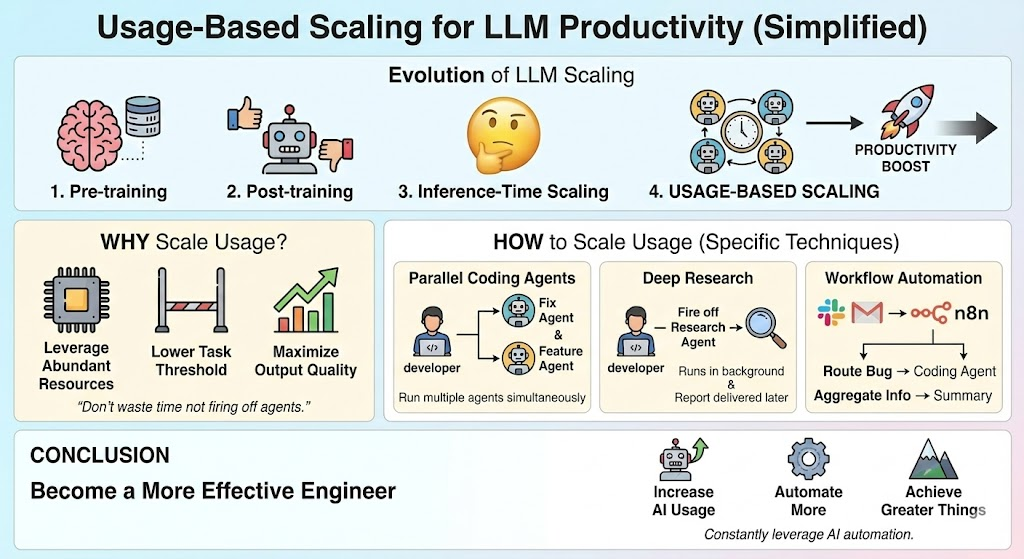 This infographic highlights the main contents of this article. I’ll first discuss why you should scale your LLM usage, highlighting how it can lead to increased productivity. Continuing, I’ll specify how you can increase your LLM usage, covering techniques like running parallel coding agents and using deep research mode in Gemini 3 Pro. Image by Gemini
I now argue we should continue this scaling with a new scaling paradigm: usage-based scaling, where you scale how much you’re using LLMs:
- Run more coding agents in parallel
- Always start a deep research on a topic of interest
- Run information fetching workflows
If you’re not firing off an agent before going to lunch, or going to sleep, you’re wasting time
In this article, I’ll discuss why scaling LLM usage can lead to increased productivity, especially when working as a programmer. Furthermore, I’ll discuss specific techniques you can use to scale your LLM usage, both personally, and for companies you’re working for. I’ll keep this article high-level, aiming to inspire how you can maximally utilize AI to your advantage.
Why you should scale LLM usage
We have already seen scaling be incredibly powerful previously with:
- pre-training
- post-training
- inference time scaling
The reason for this is that it turns out the more computing power you spend on something, the better output quality you’ll achieve. This, of course, assumes you’re able to spend the computer effectively. For example, for pre-training, being able to scale computing relies on
- Large enough models (enough weights to train)
- Enough data to train on
If you scale compute without these two components, you won’t see improvements. However, if you do scale all three, you get amazing results, like the frontier LLMs we’re seeing now, for example, with the release of Gemini 3.
I thus argue you should look to scale your own LLM usage as much as possible. This could, for example, be firing off several agents to code in parallel, or starting Gemini deep research on a topic you’re interested in.
Of course, the usage must still be of value. There’s no point in starting a coding agent on some obscure task you have no need for. Rather, you should start a coding agent on:
- A linear issue you never felt you had time to sit down and do yourself
- A quick feature was requested in the last sales call
- Some UI improvements, you know, today’s coding agents handle easily
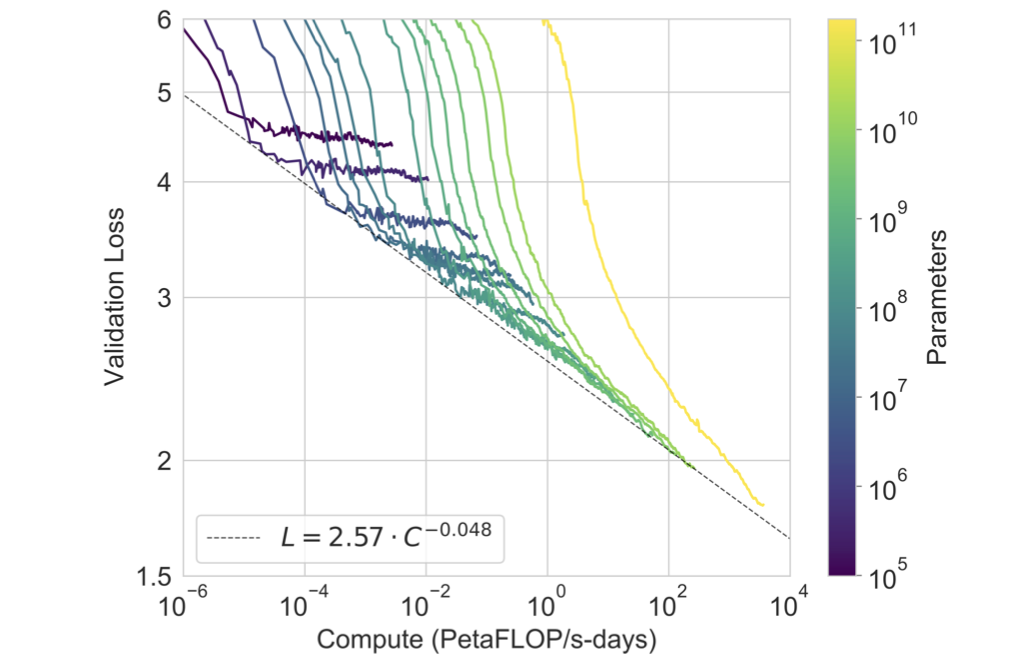 This image shows scaling laws, showing how we can see increased performance with increased scaling. I argue the same thing will happen when scaling our LLM usage. Image from NodeMasters.
In a world with abundance of resources, we should look to maximize our use of them
My main point here is that the threshold to perform tasks has decreased significantly since the release of LLMs. Previously, when you got a bug report, you had to sit down for 2 hours in deep concentration, thinking about how to solve that bug.
However, today, that’s no longer the case. Instead, you can go into Cursor, put in the bug report, and ask Claude Sonnet 4.5 to attempt to fix it. You can then come back 10 minutes later, test if the problem is fixed, and create the pull request.
How many tokens can you spend while still doing something useful with the tokens
How to scale LLM usage
I talked about why you should scale LLM usage by running more coding agents, deep research agents, and any other AI agents. However, it can be hard to think of exactly what LLMs you should fire off. Thus, in this section, I’ll discuss specific agents you can fire off to scale your LLM usage.
Parallel coding agents
Parallel coding agents are one of the simplest ways to scale LLM usage for any programmer. Instead of only working on one problem at a time, you start two or more agents at the same time, either using Cursor agents, Claude code, or any other agentic coding tool. This is typically made very easy to do by utilizing Git worktrees.
For example, I typically have one main task or project that I’m working on, where I’m sitting in Cursor and programming. However, sometimes I get a bug report coming in, and I automatically route it to Claude Code to make it search for why the problem is happening and fix it if possible. Sometimes, this works out of the box; sometimes, I have to help it a bit.
However, the cost of starting this bug fixing agent is super low (I can literally just copy the Linear issue into Cursor, which can read the issue using Linear MCP). Similarly, I also have a script automatically researching relevant prospects, which I have running in the background.
Deep research
Deep research is a functionality you can use in any of the frontier model providers like Google Gemini, OpenAI ChatGPT, and Anthropic’s Claude. I prefer Gemini 3 deep research, though there are many other solid deep research tools out there.
Whenever I’m interested in learning more about a topic, finding information, or anything similar, I fire off a deep research agent with Gemini.
For example, I was interested in finding some prospects given a specific ICP. I then quickly pasted the ICP information into Gemini, gave it some contextual information, and had it start researching, so that it could run while I was working on my main programming project.
After 20 minutes, I had a brief report from Gemini, which turned out to contain loads of useful information.
Creating workflows with n8n
Another way to scale LLM usage is to create workflows with n8n or any similar workflow-building tool. With n8n, you can build specific workflows that, for example, read Slack messages and perform some action based on those Slack messages.
You could, for instance, have a workflow that reads a bug report group on Slack and automatically starts a Claude code agent for a given bug report. Or you could create another workflow that aggregates information from a lot of different sources and provides it to you in an easily readable format. There are essentially endless opportunities with workflow-building tools.
More
There are many other techniques you can use to scale your LLM usage. I’ve only listed the first few items that came to mind for me when I’m working with LLMs. I recommend always keeping in mind what you can automate using AI, and how you can leverage it to become more effective. How to scale LLM usage will vary widely from different companies, job titles, and many other factors.
Conclusion
In this article, I’ve discussed how to scale your LLM usage to become a more effective engineer. I argue that we’ve seen scaling work incredibly well in the past, and it’s highly likely we can see increasingly powerful results by scaling our own usage of LLMs. This could be firing off more coding agents in parallel, running deep research agents while eating lunch. In general, I believe that by increasing our LLM usage, we can become increasingly productive.
👉 Find me on socials:
📚 Get my free Vision Language Models ebook
💻 My webinar on Vision Language Models
🧑💻 Get in touch
✍️ Medium