Back in the day, I used to joke with some amount of seriousness that the moment that it became possible for people to plug their brains into a computer, I’d be the first to have a jack surgically installed. I loved the idea of achieving true escape, of being able to fully inhabit digital worlds. So when the original Oculus Rift virtual reality headset was announced some years later, I was hyped. I initially thought that it would be the next best thing to a full-on Matrix-style jacking in.
And then VR actually arrived. Like many gamers, I have VR experiences I look back on fondly — Half-Life: Alyx deserves all the praise it got and more — but mostly my VR headset didn’t change my day-to-day gaming habits the way I thought it would.
I’m not here to complain about VR headsets. Honestly, they’re fun. I just don’t have that many opportunities to use mine given everything else going on in my life. Back when the Oculus launched in 2016, I was a young dad with two toddlers running around my house. My career was building momentum. I was (and still am) married, and while my wife and I love to game together, we also like to look at each other occasionally. (Weird, I know.) Wearing a VR headset involves a certain amount of separation from the world around you, and it’s been a while since I had a lot of time for that.
In a different season of my life, I might have been obsessed with VR, and maybe I will get back into it one day. But in the meantime, a new contender has caught my attention: AR gaming glasses. Offering a level of gaming immersion that outpaces my desktop monitor, but in a design that doesn’t disconnect me from the world, AR gaming glasses are a new way to game that fits my lifestyle as a husband, father, and frequent traveler.
AR gaming glasses: the basics
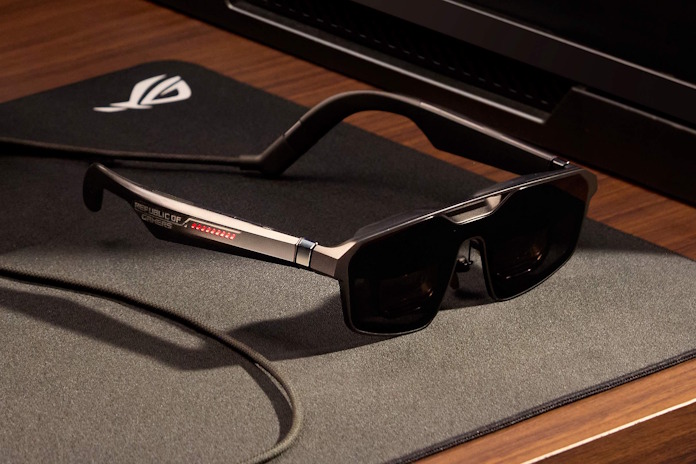
If you haven’t had a chance to check out a pair of AR gaming glasses like the new ROG XREAL R1, here’s the concept. They wear just like a pair of sunglasses, but they use micro-OLED tech to put a virtual screen in front of your eyes. The whole experience is seamless. Put the glasses on, and you’ll see a bright, gigantic, vibrant screen right in front of you. But since it’s all contained within the glasses, nobody nearby will see the screen but you.
Like other types of displays, AR gaming glasses aren’t a self-contained gaming device. They connect to your existing gear, like a PC gaming handheld, gaming laptop, or desktop PC, with a USB Type-C cable. Tech inside the glasses handles the process of turning a display signal into an output that looks natural, so it’s a plug-and-play experience in most instances. You’ll want to fine-tune the interpupillary distance setting for ideal visual comfort, but that’s about it.
Since the tech is wrapped up in a design that looks a lot like a pair of sunglasses, AR gaming glasses don’t separate you from the world the way that a VR headset does. The ROG XREAL R1 give you a 57° field of view, which just about fills up the entirety of the visual field that you actually focus on, but you’ll still be able to peek at your smartphone notifications, notice when a flight attendant is offering you Biscoff cookies, or safely take a drink of coffee.
When and where you might choose AR gaming glasses over a desktop monitor
It’s fair to ask at this point why you might want AR gaming glasses over the tech that you already have. What does a pair of AR glasses offer that your desktop display doesn’t?
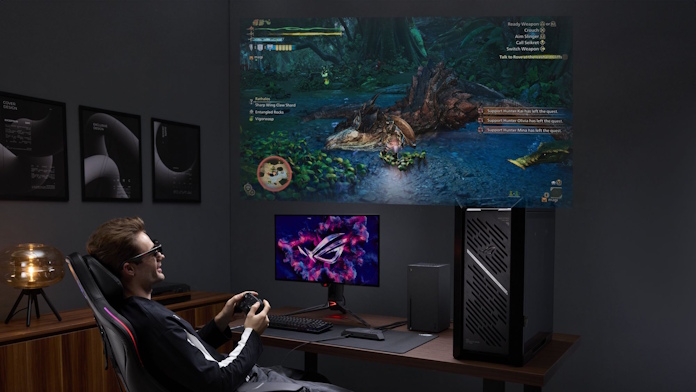
The first is size. Typical desktop gaming monitors these days are 27 inches or 32 inches. I may have mentioned my obsession with gaming immersion — I have a 43-inch monitor mounted on the wall behind my desk. But using the ROG XREAL R1 is the virtual equivalent of sitting four meters away from a 171-inch display. Remember the BFGD? AR gaming glasses are kind of like that, but much bigger.
The second is portability. My desktop monitor does not travel. My portable monitor does — but it has a 16-inch screen. AR gaming glasses, on the other hand, would fit easily in my backpack, even with all my other tech, and they’d let me enjoy that 171-inch virtual screen anywhere: on an airplane, in a hotel room, at a coffee shop, sitting on the couch next to my wife while she binge-watches true crime documentaries, anywhere.
The third is privacy. There are games in my library that I probably would have played more if I didn’t need to worry about younger eyes seeing something they shouldn’t. As much as I love the Resident Evil series, the outrageous glory kills in the new DOOM titles, and the tight gunplay of competitive esports games, I’ve chosen not to put those things up in front of my kids. Similarly, when I’m playing games on an airplane with my PC gaming handheld, I try to be thoughtful about the folks sitting in the rows behind me. In both of those situations, AR gaming glasses would let me play what I want, when I want, without giving anybody nightmares — except me.
The 240Hz refresh rate is a true game-changer
AR glasses aren’t entirely new in 2026, but the new ROG XREAL R1 glasses are probably the first to truly deserve the name “gaming glasses.” A big reason for that is their 240Hz refresh rate. I haven’t put up with a 60Hz monitor for my desktop gaming setup in years. I want fast, smooth animation for my AR gaming glasses, too.
The fast refresh rate is also a massive boost for the Anchor Mode feature. By default, standard AR gaming glasses put the virtual screen right in front of your eyes. When you move your head, the screen moves with you. There are times when that’s nice, but most of the time it’s more comfortable to “pin” the display to a fixed virtual position. That lets you look away from it to see the real world, just as you would if you were using a normal desktop display. But for Anchor Mode to work comfortably, you need display tech that can maintain pristine image quality even when everything on the screen is in motion. OLED panels already offer world-beating response time. The fluid 240Hz refresh rate completes the picture, ensuring that the content on the virtual screen stays sharp and crisp even as my head moves around naturally.
The ROG XREAL R1 allow for easy connections
USB Type-C connections are versatile and work nicely in many scenarios, but I’m glad that the ROG XREAL R1 gaming glasses go above and beyond with the bundled ROG Control Dock.
The USB Type-C ports on my ROG Xbox Ally X and smartphone allow for a quick and easy connection to the ROG XREAL R1 gaming glasses. Things get a slightly more complicated with my laptop, since USB Type-C ports on laptops don’t always support display output via DisplayPort Alt Mode. Usually, modern laptops offer at least one USB Type-C port that’s ready to roll with AR gaming glasses, but you might need a little trial and error to find the right one.
Desktop PCs are where some folks would have trouble connecting the ROG XREAL R1 — at least, if it didn’t come with the ROG Control Dock. By default, last-gen motherboards don’t have a USB Type-C port that supports display output. A modern, higher-end board with USB4, Thunderbolt 4, or Thunderbolt 5 ports will have a port that’s ready to roll, but probably on the rear I/O panel, which may not be convenient to reach when you’re sitting at your desk.
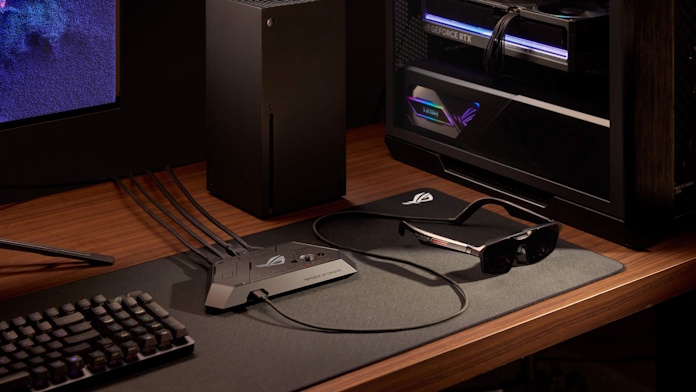
The ROG Control Dock neatly resolves these concerns. This docking station packs two HDMI 2.0 ports and one DisplayPort 1.4 port, giving you multiple options for connecting devices — or even more than one, if you’d like to use the ROG XREAL R1 AR gaming glasses alternately for both your PC and a console. When you want to use the glasses, they plug right into the front of the dock. Integrated controls make it easy to switch between inputs.
The complete package
I’m still waiting for the direct PC-to-brain interface that will give me the gaming experiences of my most outlandish sci-fi dreams — how’s Neuralink going these days, Elon? — but in the meantime AR gaming glasses can give me incredibly immersive gaming experiences in a design that’s easy to fit into my life.
The ROG XREAL R1 gaming glasses have a lot to offer: Easy connections to multiple devices through the ROG Control Dock. Immersive audio thanks to Sound by Bose. Fast and fluid animation through its 240Hz refresh rate. Comfortable viewing with Anchor Mode. Electrochromic lens technology that enables the ROG XREAL R1 to automatically adjust lens transparency to adapt to different lighting conditions. And of course, the dazzling experience of sitting in front of the virtual equivalent of a 171-inch virtual display. Since it’s all in a featherweight, portable package, I can enjoy these things anywhere that I go.
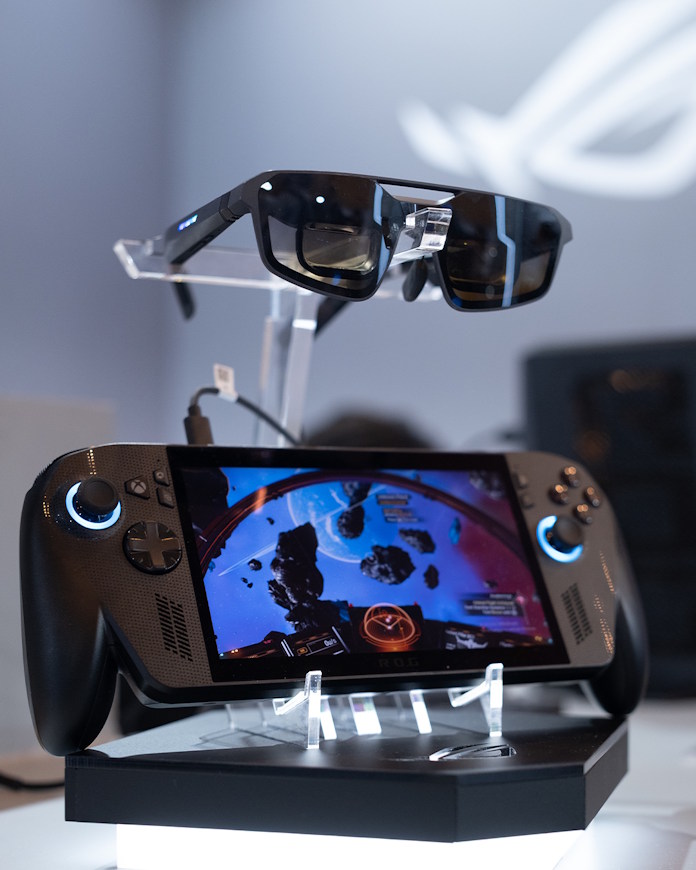
The ROG XREAL R1 AR gaming glasses will be available for sale later in 2026. For information on pricing and availability, check with your local ROG representative. To learn about all the new tech coming your way from ROG in 2026, including the ROG XREAL R1, click here.