My favorite part of using a Google Pixel phone is the excellent UI. Google forgoes OneUI’s feature bloat in favor of an easy-to-understand launcher with a distinct design language.
All of Google’s apps share the same design, so if you stick to them, you get an Android experience that’s unparalleled.
It’s why I’ve stuck with Pixel phones and apps, despite Google’s increasingly heavy-handed approach to integrating Gemini into its apps.
I regularly try out alternative apps, but none have held up to Google’s suite. That was the case for years, until I tried out the Fossify suite of apps.
While they’re not all winners, I’ve finally found a suite of core apps for my phone that give me the Google experience without the bloat.
Related
5 Google Photos features that have no good open source app alternative (yet)
Don’t switch to an open source photo app until you see this list
Fossify offers a bloat-free suite of Material You-inspired apps
Simple and useful
Fossify launched its suite of apps in early 2024. As of January 2026, its suite consists of seven fully released apps and eight apps in open beta testing.
These apps are designed to fulfill all the core apps, that is , the ones that come preinstalled on your phone.
Fully released
Beta
Gallery
Voice Recorder
File Manager
Notes
Messages
Clock
Phone
Calculator
Contacts
Keyboard
Calendar
Camera
Music Player
Launcher
Paint
These apps are forks of Simple Apps’ library, which offered straightforward and open source apps at the cost of a clunky UI and limited features.
Fossify’s apps maintain this legacy, but with a vastly improved UI and better features. They are clearly inspired by Material You, but while Google has burdened its apps with unnecessary features, Fossify keeps its apps trim.
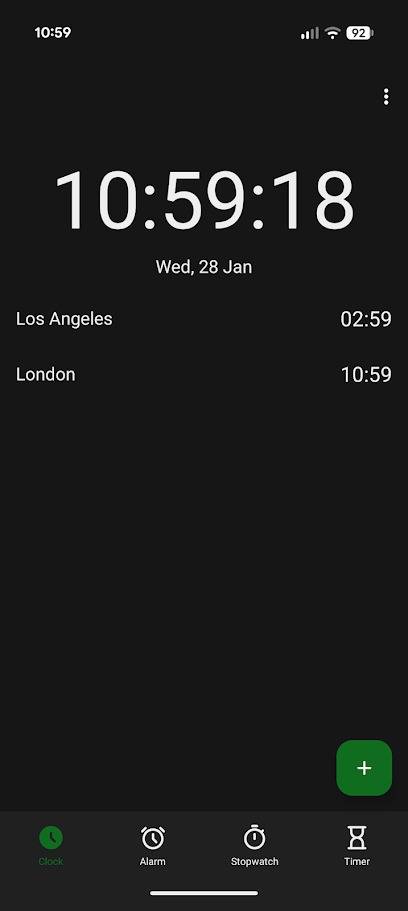
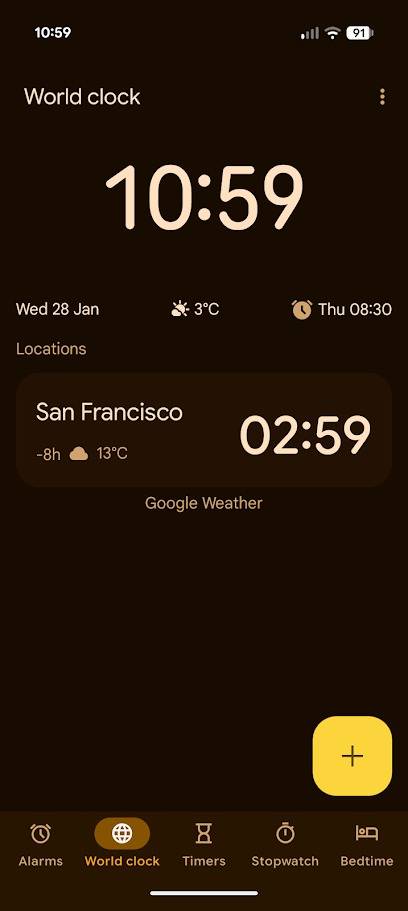
Left: Fossify Clock, Right: Google Clock
Fossify Clock is the best example of why I love these apps.
Compared to Google’s Clock app, there is no weather app integration, no bedtime mode, and no screensaver. In return, you get the ability to check the time and set alarms, stopwatches, and timers without any feature bloat getting in your way.
It’s a deeply refreshing experience and well worth the exchange for losing access to features I didn’t use anyway.
All Fossify’s apps follow the same language, but their benefits are more than a clean UI
Simple privacy and security features
As you might expect from a suite of apps built on Simple Apps’ code, Fossify’s apps have no ads, no tracking, and are open source. They also do not require an internet connection to work.
While Fossify doesn’t explicitly state this, you can switch to its apps without any fear of an AI chatbot living in plain sight and taking up space.
Fossify’s apps are also more secure. You can secure apps that store sensitive data (for example, Messages and Gallery) behind a PIN, pattern, or biometric lock. You can hide specific folders from view, or even lock photos behind individual PIN codes.
It’s not quite as sleek as Google Photos’ Locked Folder, but it’s just as effective.
Fossify’s apps aren’t perfect, but you don’t need to use all of them
You will have to sacrifice some features if you switch from Google to Fossify
I’ve replaced every Google app I could with a Fossify app with mixed results.
While Fossify Clock, Calculator, Keyboard, Calendar, and Contacts have entirely replaced their Google alternatives, others are missing out on crucial features.
For example, while I would prefer to switch to Fossify Gallery, the lack of a dedicated backup and poor search functionality mean I’ll be sticking with Google Photos.
Others, like the Fossify Launcher and Voice Recorder, are straight up inferior to Google’s apps.
I’ve become heavily reliant on Google Recorder’s fantastic transcription feature since it launched, and Fossify Recorder offers only a bare-bones recorder that saves recordings as M4A files.
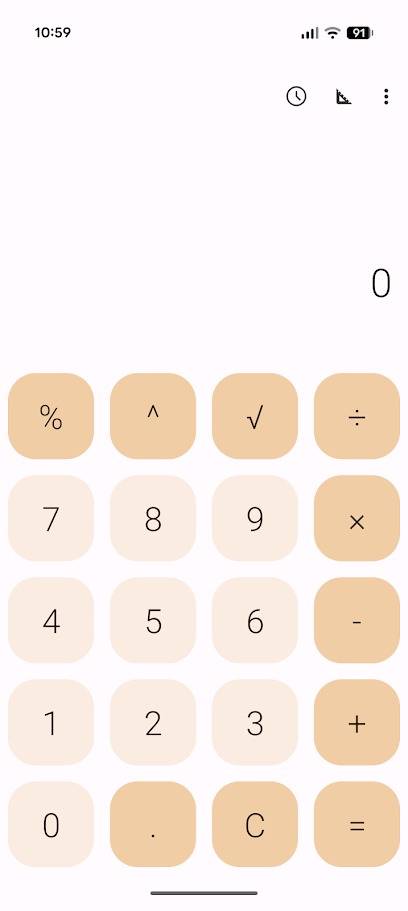
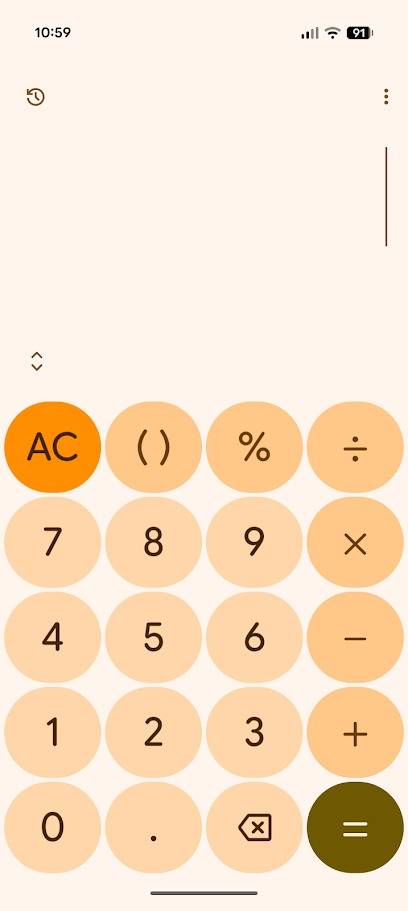
Left: Fossify Calculator, Right: Google Calculator
Fossify’s suite also lacks key apps, such as an email client, a weather tracker, and a mapping application. However, these are significantly more complex and are not currently in development.
Proton offers secure email, password manager, and cloud storage apps, but they don’t provide the same beautiful simplicity of Fossify’s suite.
Fossify is also working on a launcher, but while it seemed like a viable alternative to the Pixel Launcher (no At a Glance bar, hooray!), I found it to be frustratingly buggy to use. I’ll wait until it’s full release to try it again.
Fossify’s apps are the perfect replacement for people who love Google’s apps
Using Fossify’s suite of apps opened my eyes to how much bloat Google was stuffing into its apps. I’m not just talking about Gemini, I’m talking about all the unnecessary data Google throws my way.
I don’t need my clock app to tell me the date, I don’t need my weather app to tell me the air pressure, and I don’t need an irrelevant line of widgets on my keyboard.
I’ve worked with Google apps for over a decade, and I’ve come to appreciate their excellent design. But it’s been years since Google made any notable improvements, and newcomers like Fossify are worthy successors.
While features like syncing, online backups, and online storage would be appreciated, I respect the offline-only intent behind Fossify’s apps.
So, if you’re keen to replace Google’s apps, I recommend trying out the entire Fossify suite first.