

RingThing is an iPhone app that lets you create custom focus, iris, or zoom scale labels for ARRI Hi-5, WCU-4, and Tilta Nucleus-M II hand units. This can help skip the tedious process of marking focus rings by hand, saving time during prep and providing a much cleaner, more readable look to reference markings.
For focus pullers and camera assistants, manually marking focus rings can be one of the most time-consuming parts of camera prep, especially when working with large sets of prime lenses. The RingThing app aims at streamlining this process.
Instead of manually marking focus disks, the app generates precise, printable labels that can be applied directly to ARRI and Tilta focus rings, delivering a visually superior and more consistent result in a fraction of the time. Let’s take a look!
RingThing App – custom ring labels for ARRI and Tilta systems
Currently, the RingThing app is only available for iOS devices and can be used to create custom ring labels for some of the most popular lens control systems on the market, such as the ARRI Hi-5, WCU-4, and Tilta Nucleus-M II. However, support for cmotion, Preston, and Teradek systems is in the works, while the development of an Android version of the app depends on its success.
 Custom focus ring labels for ARRI Hi-5. Image credit: RingThing
To start, the RingThing app acts as an on-device library for LDA (Lens Data Archive) lens data files. Default ARRI Hi-5 ring files are already stored in the app, but you can also import custom lens calibration files from ARRI and Tilta hand units. Users can manage these files inside the library, add notes, sort LDAs by lens manufacturer, type, and serial number, and even share them with other RingThing friends via a QR code.
 Default ARRI Hi-5 LDA files are built into the RingThing App. Image credit: RingThing
The app then uses the lens calibration data stored in the LDA file to automatically generate a focus, iris, or zoom printable label for your chosen hand unit. You can rely on one of the available designs or create your own by customizing colors, accents, and background patterns to improve legibility, identify a camera ID, or match your branding.
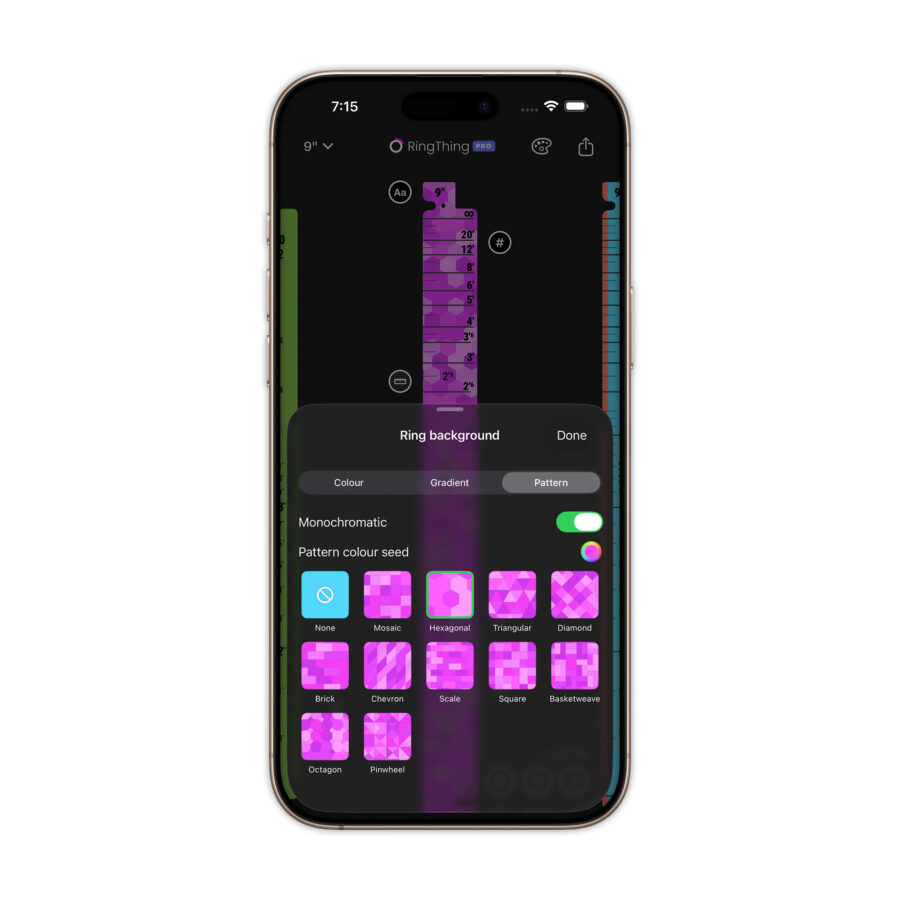 RingThing lets you customize the design of focus, iris, and zoom scale labels. Image credit: RingThing
Once you’re happy with your design, you’ll need to print and cut the label using a cutting machine, such as a Cricut device. It’s recommended to print the label on glossy white vinyl, then matte laminate it to prevent glare and enhance readability. The final step is to align and apply the label to the focus ring, which you can do precisely using the provided 3D-printable jigs.
 A cutting machine is recommended to print and cut labels generated in RingThing. Image credit: RingThingPrice and availability
The RingThing app is now available to download from the App Store. Basic functionality is accessible for free, but a Pro version is required to unlock advanced features such as importing .rng files from the ARRI ECS Sync App or converting ARRI LDA files to make them compatible with Tilta Nucleus-M II. The Pro version costs €22,99.
For more information, please visit RingThing’s website here.
What do you think of the RingThing app? Can it help you save precious time during prep? Let us know your thoughts in the comment section below!