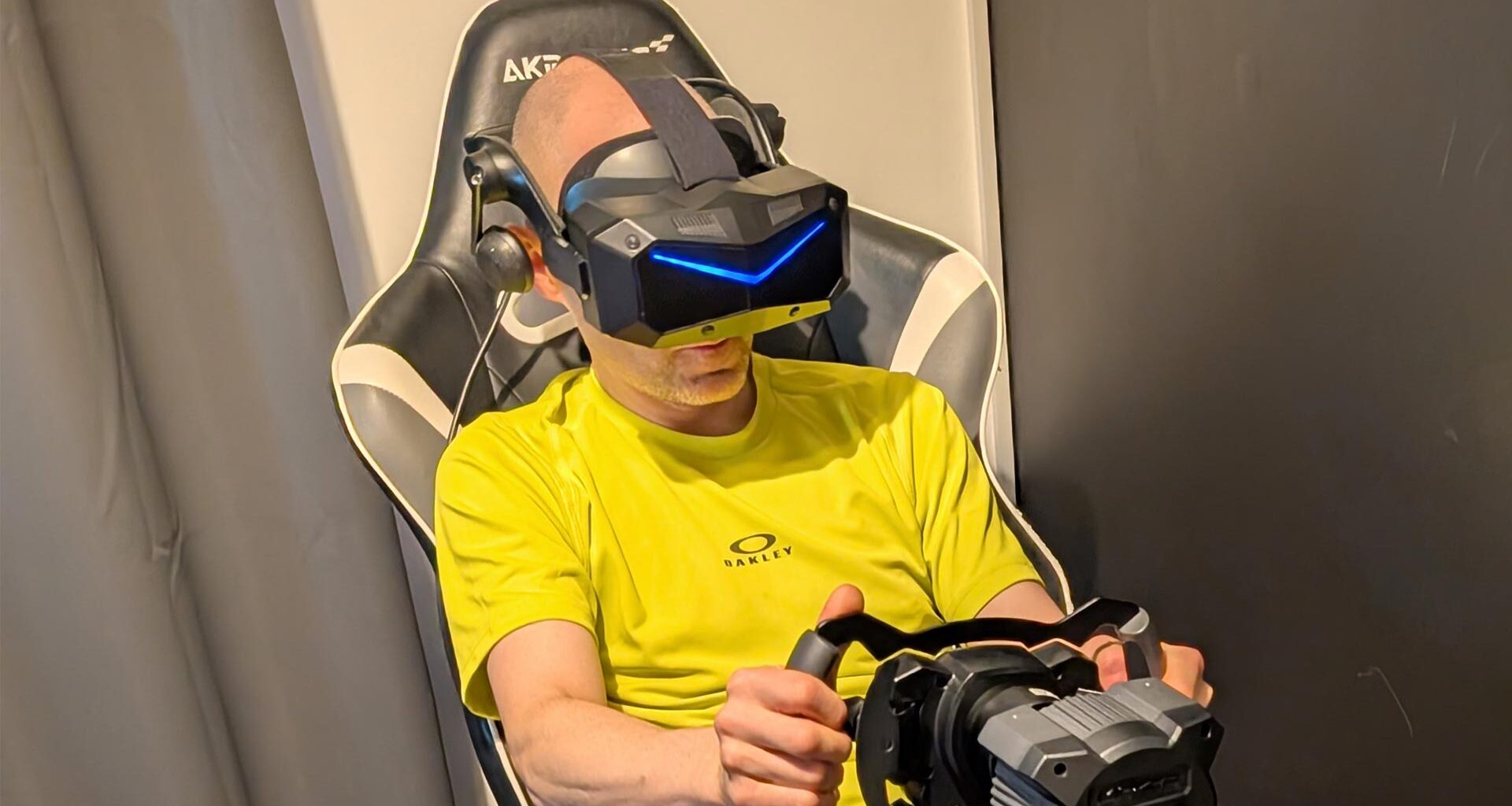
Today I have the huge pleasure to host a new article by the amazing Rob Cole, which put his hands on a Pimax Crystal Super headset and performed a super (pun intended) deep-dive on it together with his powerful PCVR setup. I thank Rob a lot for this Christmas gift of this super-detailed post and I invite you all to keep reading to discover this very poweful headset.
Pimax Crystal Super 50ppd first look. Exclusive for Skarredghost by Rob Cole
 Have a SUPER Christmas! (Image by S. Ramos and Rob Cole)
INTRODUCTION
Disclaimer: Pimax supplied the Crystal Super 50ppd and DMAS off-ear speakers for this review.
Here in this exclusive article for Skarredghost, I’m having a first look at Pimax’s Crystal Super PCVR headset. The “Super” launched earlier this year as the flagship model of their Reality series, joining the earlier “Crystal” and its baby brother, the Crystal “Light”.
The Crystal and the Light have been previously reviewed in some considerable depth by this author for the Ghost Howls. Having spent the past two years using a Lighthouse-tracked Crystal with DMAS as my daily driver, I was intrigued to find out how the new higher specification model would compare. Was it to be a Super Christmas??
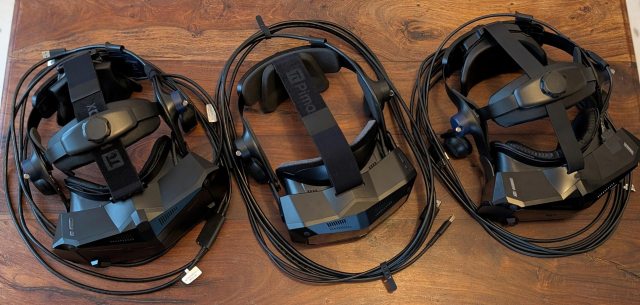 Crystal Reality series – Light (left), Super (middle), Crystal (right) (Image by S. Ramos and Rob Cole)
This first look at the Crystal 50PPD will be followed by a more in-depth review next year, featuring the new lighthouse faceplate and a full complement of Studioform Creative comfort accessories.
I’ll be applying some mods and tricks learned from using the Crystal headsets during the past two years. It may even be possible to review one of the different optical modules, depending on availability.
[Note by Tony: If this super long article is just the “first look”, I am scared by the length of the “more in-depth review”… is it going to be a full book? :D]
THE PIMAX CRYSTAL SUPER
The Crystal Super is Pimax’s new high-resolution, DisplayPort tethered PCVR headset, and is unusual in boasting a replaceable “optical module”. This large module contains the displays and lenses with some electronics and motors, and is designed to “plug and play” with the Pimax Play runtime, which should detect the relevant module and adjust the distortion profile to suit.
Users can choose from one of four optical modules, as well as purchase additional module(s) at the time of purchase, or in the future if required. The optical module design lends the headset a certain degree of future-proofing, allowing users to purchase modules with higher specifications or make cost-effective repairs once out of warranty.
This QLED 50PPD test unit reports 100% render resolution as 6240 x 6280 per eye in SteamVR with Pimax Play set at 1.0, providing a peak resolution of 50 PPD (pixels per degree), which is very impressive stuff.
Both the Crystal and Light had peak resolution of 35PPD at 100% render resolution (4312×5104 per eye), so this new Super 50PPD module with its 3.8K panels is a sizeable jump upwards in terms of visual acuity.
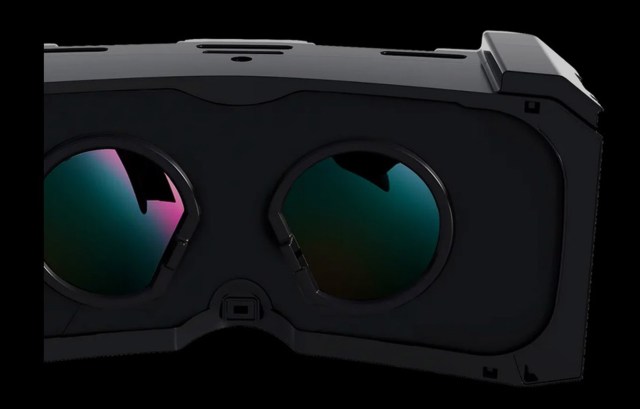 The Super Optical Module (Image by Pimax)
There is a second QLED module with 57 PPD but a narrower field of view (106 degrees) that gets very close to what is considered retina resolution of 60 PPD (1 Arc Minute). Due to the reduced FOV, the render resolution is also lower than on the 50PPD model, making it slightly less demanding on the GPU.
A third QLED 50PPD ultrawide module with a horizontal FOV of 140 degrees is available: it has less stereo overlap as its trade-off, for those who want the widest FOV.
And finally, there is also a new Sony 53 PPD MicroOLED-based module with custom pancake lenses, currently in pre-production testing by a select group of experienced VR users. Despite the jump to 53PPD, the render resolution should be less demanding due to the pancake lenses requiring a less heavy distortion profile than aspherical lenses used in the QLED modules.
More information on how to choose the correct module is found here: https://pimax.com/blogs/highlights/finding-your-perfect-crystal-super-a-guide-to-the-four-visual-engines
The rendering resolution will vary between each module, but they operate at a higher resolution compared to the previous generation and require serious compute power to drive at close to full potential in a number of popular games.
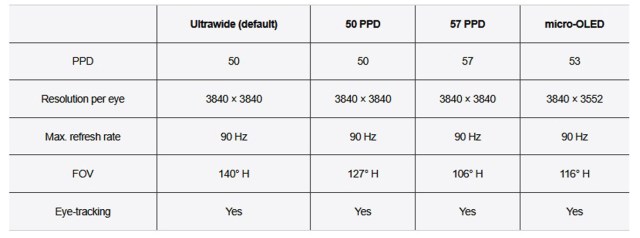 The various optical engines available for this headset (Image by Pimax)
The only downside of the modular approach is that it adds a certain degree of weight and bulk because the module has to be received by the headset housing, whereas a fixed system will always be light and smaller – the new Pimax Dream Air being a good example.
With VR headsets trending towards smaller and lighter, like the Dream Air, MeganeX, and Bigscreen Beyond 2, could the Super be the last of the “large form factor” headsets? Or will the extra field of view and modular approach prove more tempting for hardcore PCVR users?
It’s great to see that the Super headset, like the earlier Crystal models, has a good degree of modularity with a replaceable faceplate (providing a lighthouse tracking option), SMAS and DMAS speaker options, comfort head strap, replaceable cushions, and USB slots for powered accessories.
SPECIFICATIONS
This is what Pimax has to say about the 50PPD model on their website, including price at time of writing:
- Interchangeable Optical System: Available
- Resolution: 3840x3840x2
- PPD: 50
- Refresh Rate: 72Hz/90Hz
- FOV: 120° (Horizontal)
- Mode: PCVR
- Screen: QLED+MiniLED (Local Dimming)
- Eye-tracking: Available
- IPD Adjustment: Auto
- Foveated Rendering: Dynamic
- Battery: No battery needed
- Crystal/Crystal Light Lighthouse Faceplate Compatibility: Not Available
- Crystal Super Lighthouse Faceplate Compatibility: Yes (Optional)
- DMAS Headphone Compatibility: Yes (Optional)
- 5m Cable: Included
- Tracker: Available (Lighthouse Solution Limited)
Total price*(Excl.Tax): £1,393 GBP £1,352 GBP
- Upfront Payment: £626 GBP
- Prime Fee: £767 GBP £726 GBP (Payable after receiving the headset and 14-day trial through Pimax Play.)
My note– Adding 20% VAT would give a total cost of around £1622.40
UNBOXING
The Super arrived in a plain-looking but tough outer cardboard box, containing a sturdy black Pimax box inside, housing the headset, a range of accessories, and the optional DMAS speakers. At the top of the box was a “quality control” sheet with all boxes ticked, indicating everything should be working well.
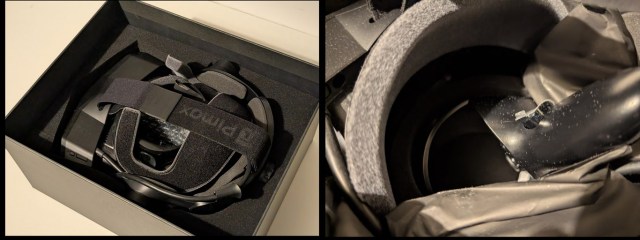 The box of the headset (Image by S. Ramos and Rob Cole)
It seemed well protected apart from the motion controllers, which were loose inside the middle area. Thankfully, the lens protector stickers were still intact, and the controllers didn’t seem to have caused any damage to the headset.
The loose controllers may have knocked against the facial cushion during transit, as there seemed to be quite a lot of small hairs on the headset and controllers, which looked similar to the face cushion material. These were easy to clean off with a lens puffer and microfibre cloth, but it’s not ideal to have an expensive product arrive in this condition, and the controllers could have caused some damage by coming loose, so it’s something Pimax may wish to look into.
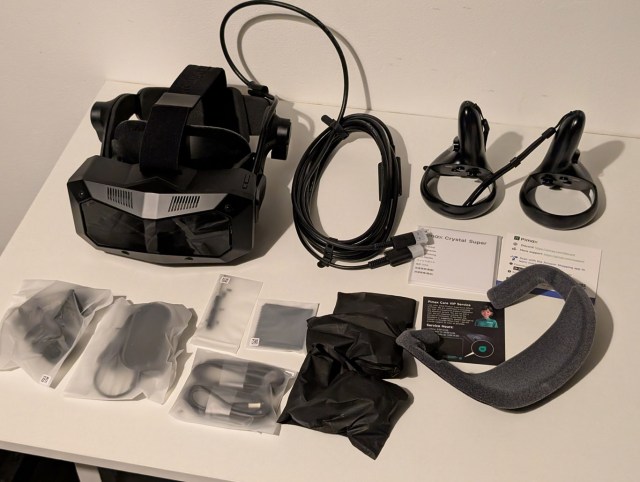 All the content of the box (Image by S. Ramos and Rob Cole)
As the image above shows, the box contained the Super headset with SMAS and tether already fitted, a pair of motion controllers, a PSU for the tether, some USB charging leads, DMAS speakers, a screwdriver, a spare face cushion, a lens cloth, and instruction pamphlets.
The build quality of the headset seemed to be an improvement on the older Crystal models… perhaps the smaller and more compact front headset block adding to the more premium feel. The black DMAS speakers were also a neat touch, finally matching the colour of the headset! Apparently, there are cooling fans inside, but I didn’t ever notice any noise during testing.
GPU to Headset Ratio
I thought about a conversation overheard at a VR festival, propositioning the idea of a “Headset to GPU ratio”. One older dev wisely said, “Never spend more on your headset than your GPU.”
Having felt slightly underpowered using the RTX 4080 with the Crystal, and being fortunate enough to have somehow snagged an RTX 5090 at slightly under retail price, I was very interested to see how it would handle the Super with a considerable jump in resolution (29 million pixels).
The RTX 5090 let my (original) Crystal hit a sweetspot of full render resolution @ 90hz in my favourite games, increasing presence by finally running the full-fat 35PPD image at a stable frame rate. Of course, you can reduce the render resolution to lower performance demands (as with my RTX 4080), but this softens the image and removes detail.
Would the RTX 5090 let the Super look better at reduced resolution than running the Crystal or Light at full resolution? We are in high-end enthusiast territory here, but would the high-end price tag be justified by a high-end virtual experience? Questions and more questions, I looked forward to finding out.
VISUALS
The high-resolution display panels are made by BOE, and a similar variant (3840 x 3744) was first used in the enterprise-class Varjo XR-4 headset, which launched in November 2023. The XR-4 currently sells in the UK at the eye-watering price of GBP £7,407.64 and requires a costly subscription to keep it running – it’s aimed squarely at enterprise customers with big budgets.
That Pimax has managed to bring these high-resolution BOE panels (3840 x 3840) to the PCVR enthusiast market at a relatively affordable price is an impressive feat in itself, considering the overall Pimax package also includes a modular optical engine, audio solution, and motion controllers, with upgrade options for lighthouse tracking and extra-aural speakers.
The headset I’ve been sent to review is the 50PPD variant using QLED + MiniLED display panels with a hardware-based local dimming function for deeper blacks, and a quantum dot layer for more vibrant colours. Having used similar but lower resolution panels on the Crystal and Light, I expected to see good things in terms of colour reproduction and improved black levels with less bloom, from new hardware-based local dimming boasting many more zones.
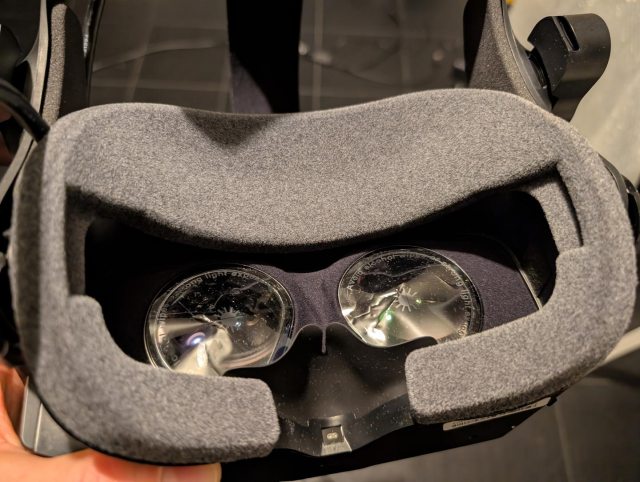 Lenses with shipping film (Image by S. Ramos and Rob Cole)
Pimax has continued using their large glass aspherical lenses with the Super featuring a brand new lens design which aims to give higher clarity, generous stereo overlap, and a wider field of view compared to the Crystal and Light models. These come with thick protective shipping film, which is easy to remove when unboxing, as seen in the image above.
The glass lenses are heavier than plastic lenses, but have a big advantage in terms of light efficiency, providing a much brighter image, with no glare compared to many pancake lens designs, and eliminating the god-rays of earlier Fresnel lenses whilst offering much higher resolving power to suit higher resolution displays.
The 50PPD model tested here gives me a noticeably wider and taller field of view (Pimax claims 127 degrees horizontal) than many recent headsets I’ve used, including the Crystal and Light models by Pimax. The vertical field of view feels similar to my Valve Index, whilst the horizontal field of view is considerably wider. Importantly, the “shape” of the view is very pleasant with a more rounded profile, whereas the Crystal is a bit more rectangular.
As experienced in my Crystal and Light, I don’t get full edge-to-edge clarity as there is some drop off of image quality in the far outer diameter of the lens, but during normal use, this isn’t seen, which means overall there is a very sharp and clear image.
It’s also very bright, with Pimax claiming 200 nits, which seems fair as it’s very noticeable when comparing to my Crystal, which already is a headset brighter than many.
Like the Crystal, the Super has Tobii’s performant 120Hz eye tracking built into the lenses with infrared emitters clearly visible once the headset powers on. The eye tracking has its own calibration routine, which is quick and simple to use, whilst users have a number of eye tracking-related options in the Pimax Play software.
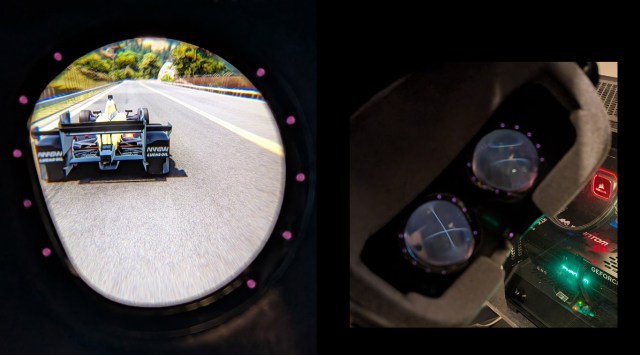 Lens with eye tracking incorporated (Image by S. Ramos and Rob Cole)
IPD adjustment is normally automatic, though this was disabled in the current version of Pimax Play during testing due to some reported inaccuracies. It’s easy to adjust the IPD using Pimax Play, with the motor whirring away after you set your desired measurement. My far IPD is 63.5mm, but I found using around 65mm worked best in the Super.
Pimax Play contains software tools for independently adjusting IPD offsets, as well as a number of power user tools, including sharpness, whilst dynamic foveated rendering and quad views help shoulder the heavy rendering load in compatible applications – their injector works well in a number of openVR DX11 titles I tried during testing.
Even if the dynamic foveated rendering doesn’t always provide the mythical uplift that many DFR proponents claim, it’s still a very useful boost for less powerful GPUs or even my RTX 5090 to help it hit constant frame rates in demanding applications. Equally useful, I found in my Crystal and now the Super, it provides a more comfortable optical experience with the aspherical lenses, effectively providing the feeling of a “dynamic lens” when looking around.
Frame rate is offered as 72Hz or 90Hz, so I tested both, finding that 72Hz is very useful in some games to reduce performance needs. Neither mode has any motion blur or other artifacts. I didn’t use motion smoothing as I’m not a fan, but I understand how important it can be for users of games like Microsoft Flight Simulator, where hitting 45 FPS is considered an achievement!
AUDIO
The Super comes with a small speaker module on each side of the headset, known as “SMAS”. These are similar to onboard audio modules found on other popular headsets and do a reasonably good job of conveying game sounds and music.
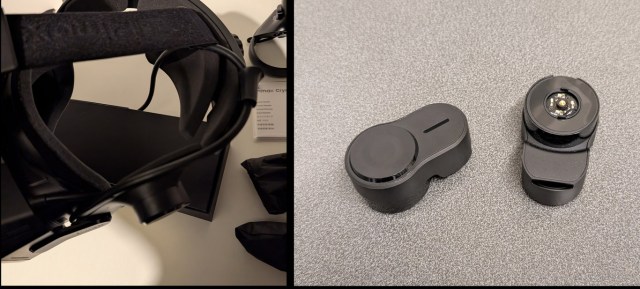 SMAS (Image by S. Ramos and Rob Cole)
I had to run the SMAS quite loud to get a good volume whilst actually wearing the headset, though my better half mentioned how much sound was leaking from my gaming room using the SMAS audio. After several sim sessions, the right speaker module started to develop an annoying raspberry-like “phhhhhhtt” noise on bass hits, which I took as the driver having developed a fault caused by my excessive volume.
Having already had adequate time to use the SMAS, I removed them and fitted the off-ear DMAS speakers, which only took a minute using the supplied tool. Make sure to align the small ridges inside the sockets with the speaker arm pivots; if there is no audio and they look slightly crooked, reset them correctly so they are flat. These DMAS are all black, but seem otherwise mechanically identical to the blue colour DMAS on my previous headsets.
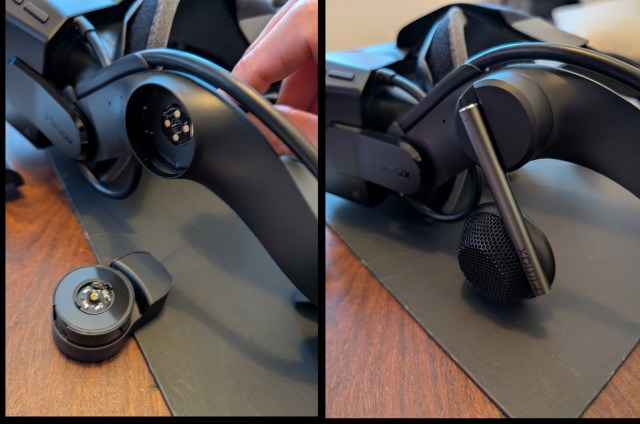 Mounting the DMAS (Image by S. Ramos and Rob Cole)
With the balanced mode radiator driver DMAS speakers fitted, I felt much more at home, able to enjoy really good quality sound with minimal sound leakage and a great soundscape. Windows listed this audio as “Pimax headphones”.
Something I noticed straight away was an improvement in the audio, with the DMAS sounding more powerful than the DMAS fitted on my Crystal and Light. Without confirmation from Pimax, I wondered if the DAC hardware and EQ software had been improved. Whilst playing different action rhythm games packed with high-quality songs, I was surprised at the musical quality of the DMAS compared to my Valve Index, which has always been the benchmark for VR audio with its excellent BMR audio off-ear hardware and highly tuned audio software.
The DMAS I’ve used in the past have been good performers, but not at the level of Index for subtle details, especially when playing music. In contrast, the new Super seems to have upped its audio game, which was very encouraging, and a definite high point during the testing.
Based on using DMAS with earlier headsets, and this further improvement with the new Super, I highly recommend the DMAS. Firstly, for the sheer audio quality, and secondly for quality of life improvements from having nothing touching your ears (no pressure/heat) and zero onboarding friction: it’s well worth the extra cost considering how important great audio is for PCVR gaming.
The microphones were well tested during online conversations with the Skarredghost, who commented, “I didn’t realise you were wearing a headset”, which is praise indeed. The Crystal also had good microphones, similar to the Super, whilst I found the Light microphones not as good quality in comparison. People using social media like VR Chat won’t have any issues with being clearly heard using the Super, and you shouldn’t need any external solutions.
DISPLAYPORT TETHER
The Super uses the same DP tether as the Crystal Light, which is a copper DP tether with a total length of about 5 metres, and an inline power connector with a small mains adapter. The only pain point with the mains adapter is that the power cable comes out of the top, which obscures the socket above on my circular plugboard. I’d like to see the power cable come out of the bottom, but this won’t be a concern for most people.
The tether is quite rigid/stiff, which, as noted in my Crystal Light review for Ghost howls last year, makes its presence felt when moving the headset or turning about when standing. This is in stark contrast to the fibre optic tether on my Crystal, which is thin and very flexible with a great length at 6.5 metres, making roomscale play very satisfying. The fibre optic tether is only possible due to the Crystal’s unique battery pack, required for standalone mod or even for tethered use. It’s not viable to do power over fibre for the Light or Super, which don’t have a battery pack.
The copper tether is less of a problem when using a sim rig, as long as it’s carefully routed to take the weight off the tether to headset connection. It should be possible to extend the USB and DP elements of the tether using active extension cables, but this would require some research to see what other owners have been successful using.
HOW MUCH DOES IT WEIGH?
Time for the trusted digital kitchen scales to make an appearance. I weighed the stock headset with SMAS speakers and the DP copper tether resting flat on the table, and it came to 942 grams.
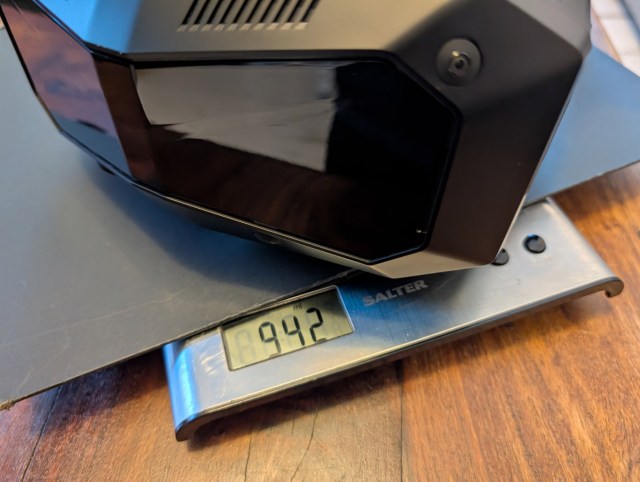 Weighing the Super with SMAS (Image by S. Ramos and Rob Cole)
I then weighed it with the DMAS speakers fitted, and the DP copper tether flat on the table, giving a total of 1038 grams. The small weight difference is minimal, with the audio improvement well worth the grams gained.
It’s also considerably lighter than my Crystal, which has a Pimax comfort top strap, Studioform cushions, Valve Index rear spacer, lighthouse faceplate, and DMAS coming in at 1.4kgs, which is actually comfortable due to great balance!
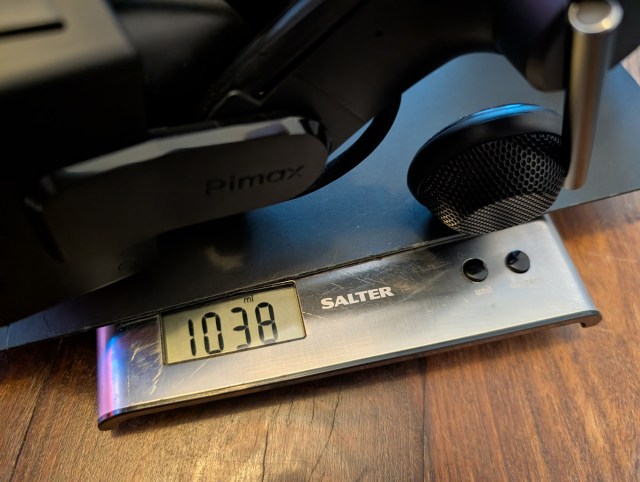 Weighing the Super with DMAS (Image by S. Ramos and Rob Cole)
Static weight is only one aspect; with the Super being noticeably smaller and more compact than the Crystal, there is an immediate difference in the amount of inertia experienced when moving about quickly.
As an example, though my Crystal is comfortable despite its high weight, inertia from its big casing means it tends to move about if moving the head very quickly, which can cause the optics to become slightly misaligned with your eyes. I wouldn’t choose the Crystal for Beat Saber due to the unwanted movement, but the Super is a better performer when moving quickly.
Ultimately, though, it’s still a relatively large and somewhat heavy headset, and these things are all relative – if coming off a heavier headset, then it’s going to feel great, but if coming from a lighter headset, then perhaps not so great.
ERGONOMICS
This is a bit of a mixed bag! Originally, the Super was shown with an adjustable eye relief using what looked like a mechanism at the front of the facial interface. I mentioned this in my Crystal Light review and said I looked forward to trying it out.
As someone with a really keen eye on XR ergonomics, this seemed like a big step forward by providing granular adjustment of the critical “eye relief” setting. Previous Pimax headsets, including the Crystal and Light, did not offer this adjustment, which had been used to great effect on older PCVR headsets like the Vive Pro and Index.
Every 1mm of excess eye relief reduces FOV by about 3 degrees, as a useful rule of thumb, whilst insufficient eye relief can cause crossed eyes, eye strain, eye dominance, or other strange results.
(optimum depth) and a usable range of eye relief. If you fall under the minimum, it can be downright unusable, and beyond maximum will reduce the field of view to leave you feeling like you are wearing swimming goggles.
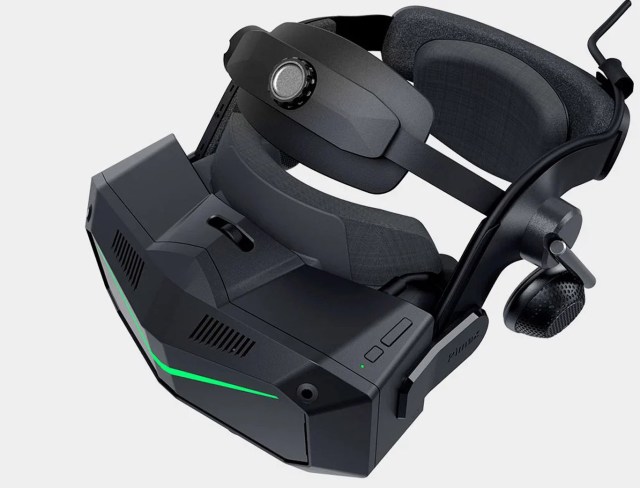 Pre-production Super eye relief (image Pimax)
Sometime before production started, the design was changed with the adjustable eye relief being ditched, which was a bit of sad news for my ergonomic sensibilities. Like the earlier Crystal headsets, eye relief adjustment would now have to be done using the thickness of the facial interface, with a thinner cushion bringing the eyes closer, and a thicker cushion moving the eyes further away.
Simple yet somewhat crude, as it prevents any granular adjustment, the jump in thickness between different cushions is quite prominent. It does not allow for really fine-tuning adjustment, or to adjust as cushions compress over time, meaning your eye relief will change as the cushion loses depth – always a concern with heavier headsets.
Initially, I removed the stock face cushion with the forehead support, as I’d always found the Pimax forehead-type cushions uncomfortable in the past, so I installed a thin, regular shape Studioform Creative face cushion without any forehead support.
Whilst physically comfortable, this brought my eyes slightly too far forward, causing a strange sensation in my left eye, which started to give me an unpleasant eye strain, followed by a mild headache which persisted for half a day, following the first hour of testing. Initially, I was unsure if there was an issue with the left lens, like a distortion.
For my next session, I switched back to the stock face cushion and found it set my eyes at just the right eye relief distance, making my session optically very comfortable (both lenses working normally), which was a big relief after my earlier misadventure.
I’m assuming the stock face cushion with the forehead support is providing the correct eye-relief distance for my personal needs, but other users’ experience will vary as facial differences between individuals can vary eye relief +/- 6mm.
Overall, I was disappointed by the lack of mechanical eye relief adjustment, as adjusting eye relief correctly is super important, despite IPD getting all the glory (or blame). The eye relief can be adjusted using different cushions, so you should be able to get it right with some testing, but it’s a bit of a sore point for me, considering the importance of getting the optical stack really dialled for each user with a super high-resolution headset.
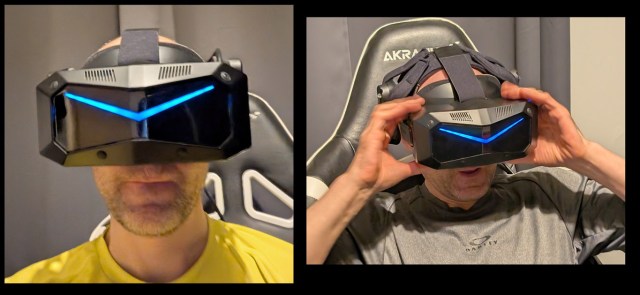 Wearing the Crystal Super (Image by S. Ramos and Rob Cole)
As the stock face cushion worked well for me, I didn’t need to make any changes apart from adding a velcro shim on either side to reduce the width of the face cushion, as there was a slight wobble when moving my head about, compounded by the lack of a left-to-right “comfort strap”. The facial interface certainly seemed narrower than the earlier Crystal headsets, which required several shims on either side to shrink down the huge face cushion base to something more supportive.
The Super has a long, wide headstrap running from a slotted bracket at the front of the headset block to a slot atop a pivoting cradle containing the rear cushion. This is a bit different from the design of older headsets like the Vive Pro or Index, which mount the strap directly to the rear headstrap, so you are tying the elasticated strap to fixed points at either end.
I noticed the rear cushion had been redesigned for the Super, now boasting a slight bulge at the bottom edge, perhaps to get some traction, but this bulge seemed to make things more uncomfortable for me than using the flat cushion of the Light.
This different setup on the Super may present an ergonomic challenge depending on your physiology. I’ve already explored “the strap issue” on the Crystal Light in my earlier review for Ghost Howls, but it essentially comes down to this:
“The top strap is not fixed at the rear of the headstrap, but attached to a slot atop a pivoting cradle, which has the rear headset cushion fixed inside. Ideally, this cushion wants to sit at a negative angle to match the angle of the rear of the head.
When the strap is put under tension (headset donned), the hinged plate pivots forward, causing the rear cushion to rotate forward (positive angle) and start to lose contact with the back of the head, instead of firmly gripping. Increasing the strap tension to tighten the headset just made it seem to pull up more.”
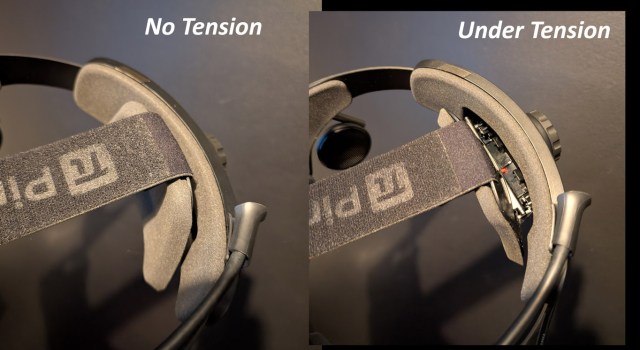 Rear hinge plate (Image by S. Ramos and Rob Cole)
With a similar design to the one found on the Light, it had the same effect for me; it was a bit unstable at the rear as it moved around. I found that after about 30-40 minutes, I would start to get a dull pain at the rear of my head where the bony ridge (lambdoid suture) is located. The new bulge on the lower part of the cushion seems to exacerbate this. After two hours, it became uncomfortable, forcing me to take the headset off and massage my head. The Super, with its stock rear strap setup, can be seen in the image below left.
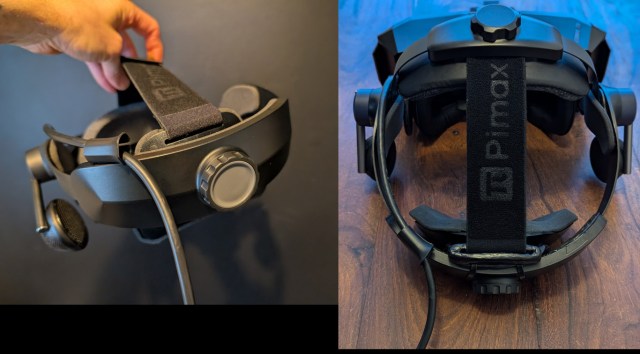 Cystal Light headstrap MOD (Image by S. Ramos and Rob Cole)
This was the same situation I had experienced with my Crystal Light, as I could feel the rear cushion on the Super moving up and off my head when I looked around in VR, instead of allowing the top strap to firmly secure my head by gripping the occipital bone with the cushion at the correct lean angle to suit the nape of the neck.
However, all was not lost, as this is something that could be rectified with a small modification I’d done on the Light I tested last year (seen above right); attaching the rear end of the strap to a fixed plastic moulding mounted inside the rear harness, leaving the pivoting plate and its cushion free to track the head. This mod was non-destructive, so it caused no damage to the headset.
The 50PPD headset I tested didn’t have the Pimax “comfort strap” (which runs from left to right), which I had found very useful on the original and Light… though the Super has a slightly different strap, so I could not use one from those headsets. This was something I planned to source as soon as possible, but I managed to use a spare Studioform Creative Apache strap toward the end of my initial testing, which improved comfort and stability.
Overall, I was pleased with the face cushion, but less pleased with the lack of eye relief adjustment and the design of the rear headset harness with its pivoting cradle/strap. I thought the headset could benefit from the Pimax comfort strap to further support and stabilise what is still a heavy headset, whilst I could explore the harness mod in the future, which should cure my rear fitting issue.
As with all things body worn, VR is very personal, and my ergonomic issues may not be experienced by other users. Like with their previous headsets, it’s easy to add extra straps, new cushions, counterbalances, and ergonomic mods, so it’s not a dealbreaker by any means, as both my previous Crystal headsets are modified, which made them very comfortable to wear.
SETUP
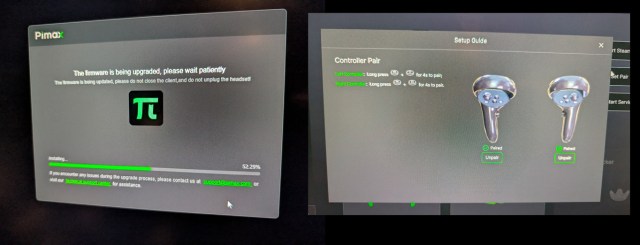 Applying updates (Image by S. Ramos and Rob Cole)
Setup was very easy, a quick firmware update to the headset, and later on, for the motion controllers. The headset turned on straight away, was recognised as the Super model, and connected every time during my testing. I didn’t have any issues with distortion profiles when swapping from the Super to the Crystal and back again during testing. The motion controllers connected first time, and seemed comfortable enough with a layout similar to the popular Quest controllers.
I’m using an ASUS ROG Hero motherboard with great USB power delivery, which may have helped in eliminating any connection issues that some other users have reported. Pimax Play stability was good during my testing; I cannot claim to have had any issues. It was easy to leave my Super connected to my PC, and just insert the mains power adapter into the tether when I wanted to use it.
TRACKING NOTES
Admittedly, my Intel 8086K CPU is below the minimum recommended specification, leading me to take the gamble of testing the headset using my current PC. However, as you may or may not know, we are typically GPU-bound in PCVR, unless running really CPU-intensive software.
Generally, we are playing the same old games, but at higher resolutions with the new headsets, which are much more GPU-intensive, way beyond desktop usage. The new generation of high-resolution headsets is ideally paired with the RTX5090, which is a serious upgrade for PCVR users, as it can do a lot of work very quickly, even compared to the previous 4090.
Playing many different VR games, I have rarely run into issues with CPU timing as my system runs @ 5.2Ghz using a special delidded and speed-binned CPU supplied by World Champion overclocker 8-Pack (thanks Ian). The lighthouse tracking used by my Crystal and Light is much less demanding of CPU resources than SLAM, which is welcome when pushing PCVR systems to their current limits, rendering very high resolutions whilst running multiple applications.
The Super uses Pimax’s in-house SLAM tracking system, which is somewhat computationally intensive (machine vision), requiring extra CPU resources from the client PC. Unlike the Meta Quest headsets, which contain a Qualcomm Hexagon DSP, or Lighthouse tracked devices, which have a tiny SIP doing tracking calculations, the Super will use your CPU’s general-purpose core(s) for tracking calculations, which means your results will vary depending on the strength of your system and the different applications you are running. It’s also possible to use applications like Process Lasso on modern CPUs to allocate applications and processes to different cores, which can make a useful difference.
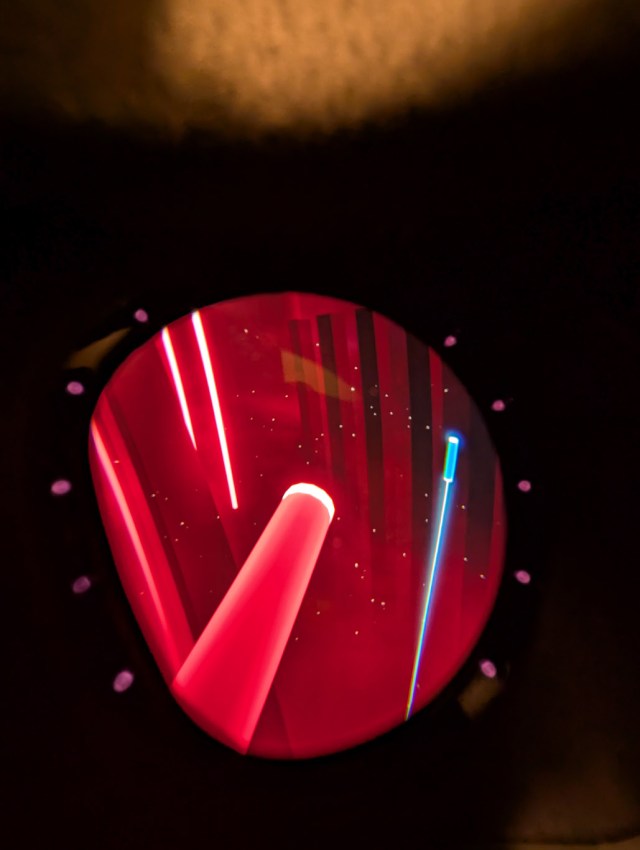 Playing Beat Saber on the Super (Image by S. Ramos and Rob Cole)
Thankfully I was pleasantly surprised, finding the headset tracking very good with no drifting or jitter during my testing, and the controllers were also good when I played several rhythm games to just see what would happen.
I hadn’t expected them to work well, but Beat Saber, Synth Riders, and Pistol Whip all worked as normal, suggesting that the simpler games with less CPU demands were suitable on my older system. I then tried more demanding games like “Pavlov” and “Into the Radius 2” using the motion controllers, which suffered a big tracking freeze and crash each time I tried.
I checked the task manager and could see the Pimax software placing a big load on my CPU, sometimes asking for over 20% of total resources. Playing sim games without any controllers seemed to work well, though I am not playing DCS World or i-Racing, which can be very CPU-intensive, where a CPU upgrade would be beneficial.
Overall, I was actually impressed and surprised that the Super worked as well as it did with my under-specification CPU, and the headset tracking was performant enough to let me enjoy driving for hours without any issues.
With the lighthouse faceplate on the way soon, I looked forward to being able to play more of my complex games without any tracking issues. As mentioned already, with a more modern CPU, you’ll probably have a better time with the complex games, though the SLAM-based tracking will always require more client resources than lighthouse tracking.
PLAYSPACE ISSUE
Though the tracking worked well (in sims and less demanding games), I ran into recurring issues with ground height and playspace location. During several weeks of testing, it would often not accurately determine ground height, forcing me to do another room setup or make adjustments each time. When taking the headset off and putting it on my desk for a minute (pausing for a drink, or to grab my phone), it would often forget its height and position, leaving me far outside of my playspace. If paused in the middle of a game, I’d have to run the room setup again, which would quit SteamVR after closing the game; I’d have to relaunch SteamVR and then the game after doing the room setup. It got a bit tedious.
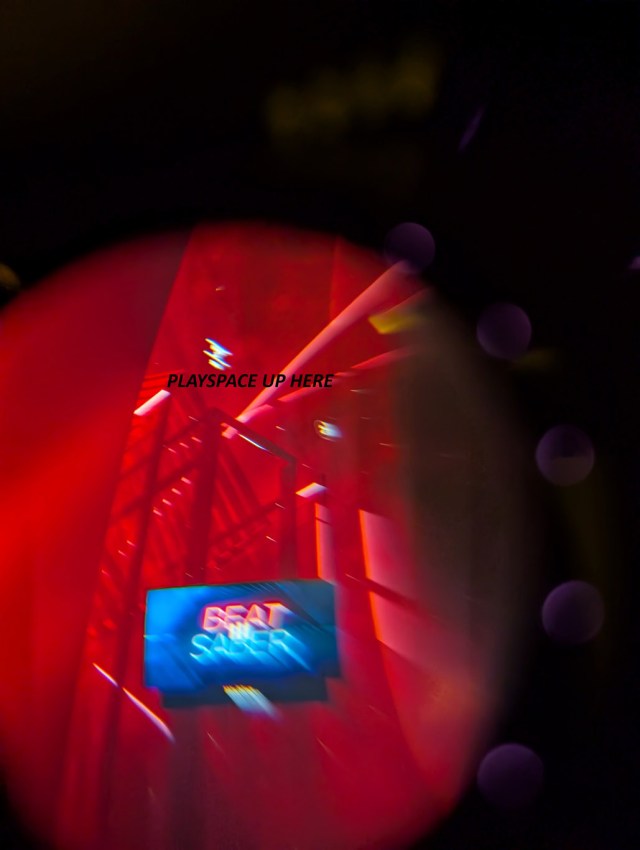 My playspace shifted quite a lot after a break… (Image by S. Ramos and Rob Cole)
During testing, I found the usually reliable “FPS VR” not working correctly, unable to adjust ground height or position in the normal way. I had many strange views of SteamVR in the home environment and in games, often finding myself way below ground. As the image above shows (a poor through the lens shot from Beat Saber), my playspace could be far away, and I couldn’t get home.
I had best results when simming as my driving games and Aircar each have VR view centring controls, allowing me to quickly get myself in the right place, so I’d negate the need for room setup.
The room setup itself was neat, offering a simple or more complex setup, seated or standing, a range of boundary sizes, and even room scanning to create a mesh. I tried this mesh generation just once and got stuck inside a tubular grid, so I didn’t bother again.
Going back to my Crystal and Light testing, I had similar issues with ground height and position before installing the lighthouse faceplates, which had eliminated any of those pesky setup issues. This is something I looked forward to testing thoroughly once the new lighthouse faceplate arrives, and it will be neat to use my Valve Index, Vive Pro, and Pimax Sword controllers with the Super.
THE VR EXPERIENCE – HIGH END?
After thoroughly enjoying my driving games with an Xbox controller during the first two weeks of Super testing, Santa Claus must have thought I had been a good boy this year, after I took delivery of a Moza wheel and pedal bundle along with a sturdy steel wheelstand.
This provided the perfect companion for the Super headset, giving me a much more intensive driving experience rather than the shorter sessions I usually did with the Xbox controller. I was certainly slower at first, finding the transition to wheel and pedals quite a shock after years of driving with a gamepad.
The Super really helped with its incredible distance clarity and wider horizontal field of view, making me genuinely feel more present in the game, especially with competing cars around me on track. The feeling of being on track was very convincing, even compared to my Crystal, which was already fantastic in that respect, even with the gamepad.
The copper tether didn’t prove a distraction as I had it resting on my rig, and the DMAS speakers did a great job of hiding the metallic clacking from my shifter pedals and occasional heavy foot braking!
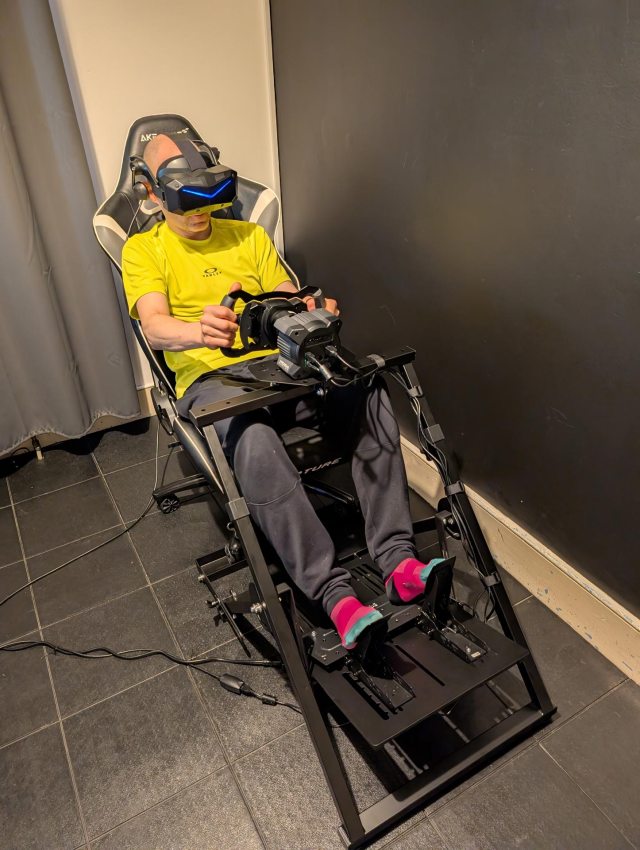 Sim racing with the Pimax Crystal Super and my new toy (Image by S. Ramos and Rob Cole)
Playing my favourite racing game, “Project Cars 2” was a complete blast. I used the Super at 80% resolution and 72Hz to keep things sensible. I tried turning the resolution up to 100% but even the mighty RTX 5090 made its feelings known, with some inconsistent frame rates whilst rotating through detail-rich corners, so I turned it back down. This reduction led to a slight softening of the image compared to full resolution, but it was still very impressive.
The overall thought during testing was “amazing image quality”, as the picture was very sharp, bright, and incredibly clear. Initially, though, the colours looked a bit washed out, and contrast felt too high, making things look a bit artificial, especially in direct sunshine. Soon, though, I noticed a visual artifact when driving along the California Highway, which follows the coastline so you have the sea and sky on your right-hand side.
Looking across the sky, I could see faint patterning in the far background, which was catching my attention from time to time. On my next run, I stopped and “got out” of my car so I could take a through-the-lens image using my smartphone, set on video mode. I was lucky to grab a decent still image, which shows this faint patterning.
Doing some research, I learned this was something also seen by other users with the Super and the older Varjo XR-4 headset, as well as Sony’s PSVR2, and was a manifestation of a display panel manufacturing inconsistency known as “Mura”. This mura wasn’t really noticeable unless I looked away from the track at certain points with large open areas of sky and focused on the very background.
 Mura pattern noticeable on the sky of the game (Image by S. Ramos and Rob Cole)
I followed a recommendation from another Pimax user to lower the brightness and contrast for each eye (I tried -2), which made a big difference to reduce the appearance of the mura whilst also much improving the overall image quality by giving more natural colours and balanced contrast.
With 200 nits of brightness at maximum, there was certainly room to play, so even with slightly reduced brightness, it still looked brighter than my Crystal. Switching back to my Crystal, I realised I still had the -2 settings applied, as it looked a bit dim, until I reset it to the default of 0, which gave a similar feel to the Super on -2.
The mura was not something I saw in the rhythm games or even in Aircar (which has a textured skybox): it’s going to be more noticeable in games with large backgrounds of a single colour, like flight sims. During Project Cars 2, there was no evidence of the issue on the track, in near ground or mid ground (anywhere with detail), only across the back of the skybox when run at full brightness.
I remember seeing mura on earlier headsets like the Rift CV1 and Vive, though mura is found on both LCD and OLED displays, with manufacturers of expensive display panels using special measuring equipment and “demura” software to minimise its effects.
Mura defects create visible inconsistencies in colour balance and image uniformity. The defects are often caused by manufacturing variations in liquid crystal deposition, material impurity, backlight assembly, and panel bonding, as well as mechanical stresses during panel integration.
Thankfully, on my particular headset, by reducing the brightness and contrast, I minimised any mura to the point where it almost disappeared completely. From what I read, I learned it might be something called “line mura”.
Aircar was run at 100% resolution and 90Hz, my RTX 5090 seemed quite happy chewing all those pixels, and the headset tracking was working as normal. An Xbox Elite 2 controller was used to pilot the vehicle. Aircar has long been used as a great visual benchmark for testing new headsets, as it was built by a professional video game artist from Ubisoft, which means it contains some high-quality assets, clever visual tricks, and really spectacular lighting.
As someone who has been using Aircar since it launched many years ago, and had used it with every new headset and GPU upgrade, I was completely floored by my experience using the Super and RTX 5090. It finally felt like a new level of visual threshold had been reached!
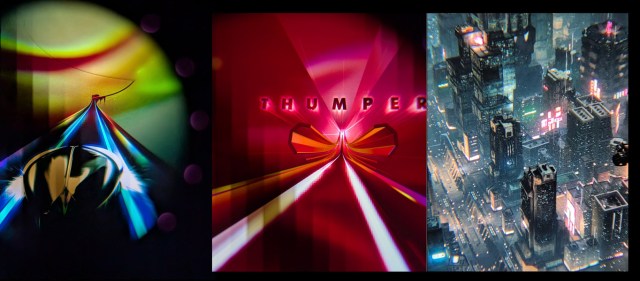 Through-the-lens with Thumper and Aircar (Image by S. Ramos and Rob Cole)
I started noticing huge amounts of extra detail, including many subtle things, and had a razor-sharp view from air to ground, revelling in the amazing bustle of the city below. The brightness of the Super combined with the big field of view and sharpness, gave an awe-inspiring experience. I had a number of “ha ha” moments just flying around and looking at the city from different angles.
I’m used to playing Aircar using my Crystal with super sampling and being very impressed, but the Super felt like a generational leap in terms of picture quality, field of view, and brightness. It takes a lot to impress a VR veteran like myself, so I considered this a “job well done”, congratulations Pimax!
I also played Thumper, Grip, Assetto Corsa, and a number of other seated games and found it handled fast motion very well with no motion blur either at 72Hz or 90Hz. Something else that was a nice surprise was minimal chromatic aberration, which wasn’t really seen using the Super, apart from on the edges of overlays (for example, a race conduct warning popping up during a sim race, very similar to the first Crystal headset). I didn’t see the issue during any gameplay itself.
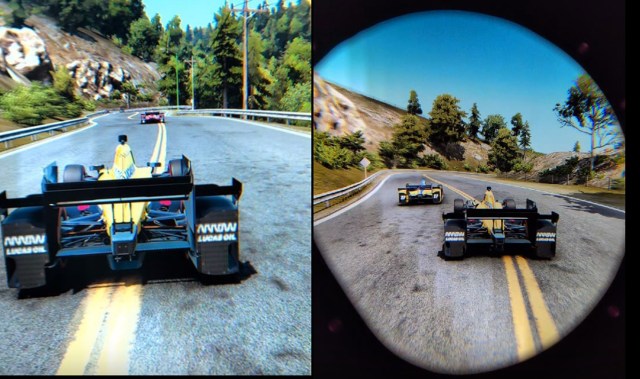 Impressive through-the-lens of Pimax Crystal Super (Image by S. Ramos and Rob Cole)
The Good
- Razor-sharp image, a new level of visual fidelity
- Much brighter than many headsets
- No glare through lenses
- Minimal chromatic aberration (edges of overlays)
- Generous field of view, both vertical and horizontal
- Good stereo overlap, optically very comfortable
- Excellent audio quality with DMAS speakers
- Smaller and lighter than previous Crystals = less inertia
- No motion blur in 72Hz or 90Hz
- Tobii 120Hz eye tracking
- Pimax Play very stable, great range of power user adjustments
- DFR and Quad views functionality inside Pimax Play for suitable games
- Headset tracking stable, no jitter or drift
- Motion controller tracking worked well in simple rhythm games
- Lighthouse faceplate due in early 2026 to provide tracking upgrade
The Bad
- No mechanical eye relief adjustment
- Automatic IPD not working during tests
- Headstrap quite uncomfortable and unstable at the rear
- No comfort top strap included with headset
- Stiff and short tether can interfere with the headset during free movement
- Visual artifacts: faint Mura in the background sky or flat colours
- Tracking requires high-end CPU for complex games
- Very high system demands, even RTX 5090 struggles
The Ugly
- Playspace location and ground height inconsistent during sessions
- SMAS developed a possible fault in the right driver
- Controllers loose in packaging, small hairs covering contents.
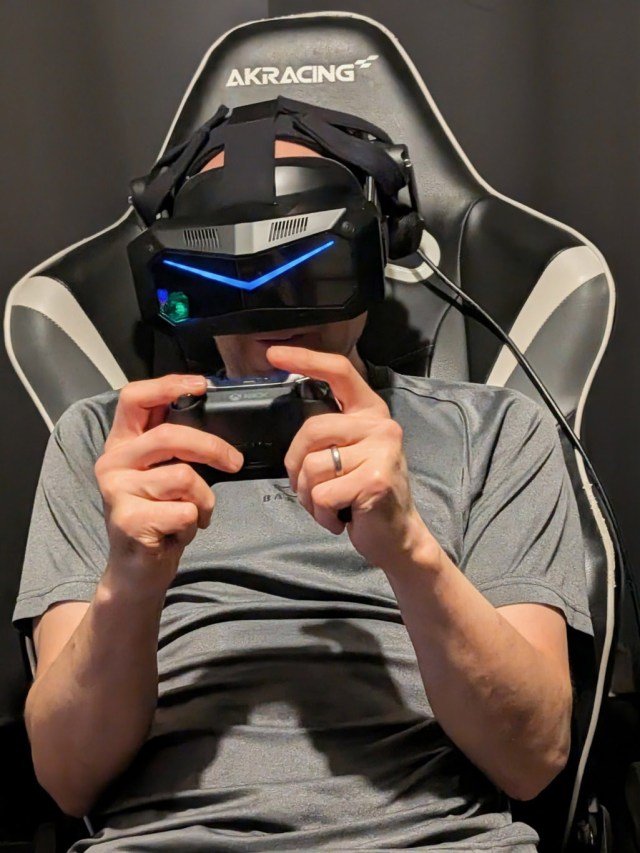
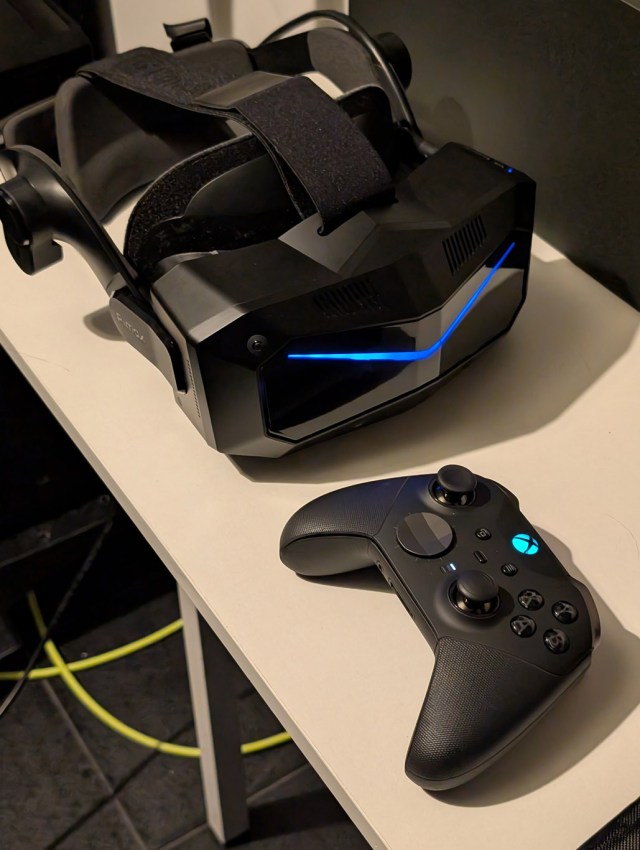 Pimax Crystal Super and gamepad controller (Image by S. Ramos and Rob Cole)
CONCLUSION
Having been very satisfied with my original Crystal, I wasn’t sure what to expect with the new Crystal Super, but soon realised the visuals were a generational leap from a combination of the very high resolution, increased brightness, and larger field of view.
The new lenses are another improvement with generous stereo overlap, making things feel very comfortable on my eyes once the IPD was set correctly and the eye relief was correct from using the stock face/forehead cushion.
Testing the headset before a lighthouse faceplate was available proved interesting, with the SLAM tracking working really well in my sim driving games and rhythm games like Beat Saber or Pistol Whip, whilst my older CPU struggled with more complex games, as expected.
Visuals and Audio are top-notch, though the presence of mura will vary from headset to headset, or even from panel to panel. From reading the popular subreddit, some people have asked Pimax for the optical module to be swapped out after finding too much mura, whilst others have not had an issue.
 Game Time! (Image by S. Ramos and Rob Cole)
Pimax graded the panels according to mura, with grade 1 being minimal/acceptable, which is what they aim to use in their headsets. Having experienced no mura in my original Crystal, it was something I had half expected from reading early Super reviews, but interesting to experience for myself and figure out what I was actually seeing, as it wasn’t super obvious unless focusing on the far background.
Thankfully, I managed to mostly mitigate these artifacts in my own unit by reducing brightness and contrast, which also improved the realism of the picture quality, giving a similar colour balance to my original Crystal.
If you play flight sims where the mura could be more noticeable, or have a unit with stronger mura, you may wish to have the module swapped.
Alternatively, wait for the Sony Micro-OLED module: the technology doesn’t have mura due to its manufacturing process. Overall, I’m very satisfied with the image quality despite not running at 100% render resolution in many titles, and it seems like a genuine upgrade over the Crystal and Light. Perhaps the biggest difference was the extra field of view and the brighter display, rather than just display resolution in itself?
It’s definitely one of those headsets that will truly benefit from the next generation of GPU once available, just as my original Crystal and Index did before, so I expect to run full render resolution @90Hz once the RTX6090 comes out.
Big thanks to Daisy @Pimax for sending the review unit, which I plan to keep testing across more games, and will revisit in the second article next year once the lighthouse faceplate arrives, and the Studioform Creative accessories have been fitted. I’ll also be sharing my rear harness mod in more detail, and any further mods I have installed.
THE HIGH-END QUESTION?
Finally, to answer my original question, was the VR experience high-end? Yes, no doubt.
Definitely a high-end experience, especially visuals and audio, even tracking worked well with my older CPU!
It really demands the fastest GPU you can currently buy, but this is to be expected in the high-end enthusiast market… there is a huge amount of pixels being pushed here.
You certainly can run the Super with a lower spec GPU, as the eye tracking tools and different settings provided in Pimax Play will let you find a good compromise.
The Super will only further improve, as software continues to develop and the new lighthouse faceplate is released, which I am looking forward to testing in the New Year with my base stations and lighthouse controllers. Thanks for reading, I hope you have a Super Christmas! (Or Winter Holidays, depending on what you celebrate!)
(Header image by S. Ramos and Rob Cole)
Disclaimer: this blog contains advertisement and affiliate links to sustain itself. If you click on an affiliate link, I’ll be very happy because I’ll earn a small commission on your purchase. You can find my boring full disclosure here.
Share this with other innovators
Related