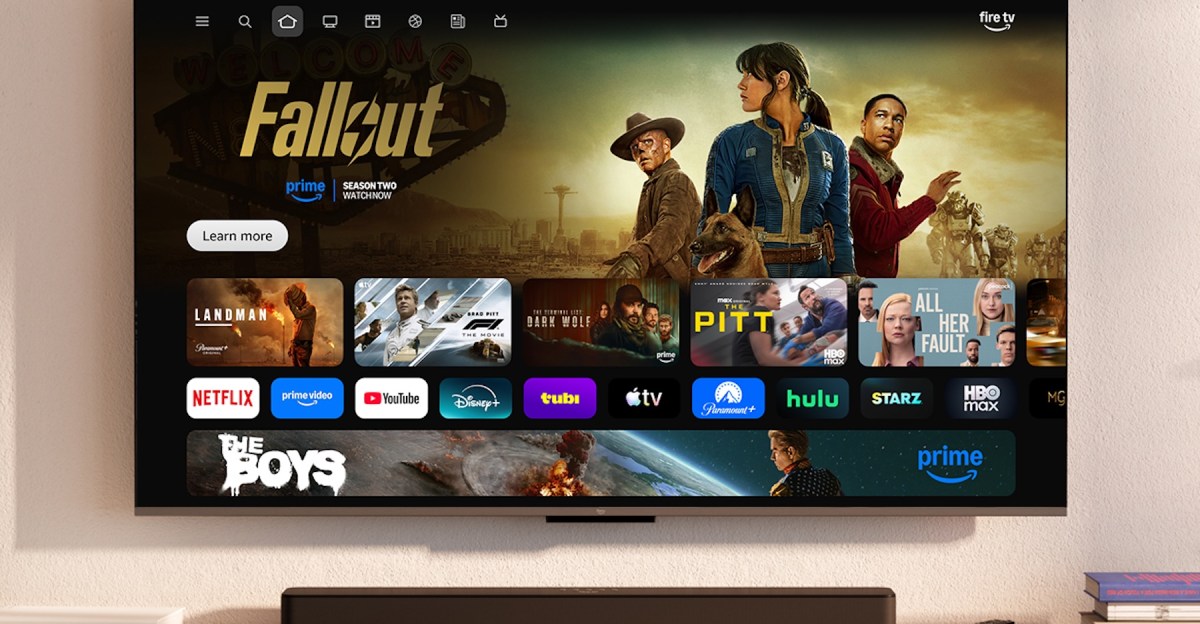
Amazon Fire TV has been a bit long in the tooth for a while now. Its design isn’t as intuitive to navigate as Google TV, Roku, or Apple TV, and its responsiveness is frustrating. I’ve found it to be the weak link in Amazon’s portfolio for a while now, and the only major drawback to otherwise excellent TVs like the Panasonic Z95B. But after getting a demo of what Amazon has in store, I dare say I’m excited for a new Fire TV OS redesign.
The new layout is better organized and reminiscent of Google TV (which has been my favorite for a few years now). It’s visually more pleasing to look at, with rounded-corner tiles instead of the harsh rectangles of the current version. And its arrangement looks far more easy to navigate. Instead of in the middle of the screen alongside installed apps, there are tabs across the top of the screen for search, home, and pages separated into movies, TV shows, sports, news, and live content. Those different tabs will aggregate content from across all of your active subscriptions, instead of only by app.
If you do want to browse through your apps, they now live on their own line. And you’re no longer limited to having only six apps pinned to the homepage. You can now pin up to 20 and change their order to put your most used at the beginning of the list. There’s still sponsored content recommendations that take up a good portion of the screen, but it’s hard to escape that on any streaming OS.
The Amazon team also redid the coding for the OS for a faster experience, saying that they’ve seen improvements in speed responsiveness of up to 30 percent. With the remote you can hit the menu button to quickly get to games, art, and photos, and Amazon’s Ambient Experience. And a long press on the home button pulls up a shortcut panel to quickly access audio and display settings, check on your connected devices (such as Ring cameras), or other regularly used controls.
Amazon Alexa+ will be fully integrated with the new Fire TV OS, allowing you to search through your content, get updates and stats on your favorite sports teams, adjust your connected smart lights or thermostat, or jump to your favorite scene.
Alongside the OS redesign, the Fire TV mobile app has also gotten some love. Apart from just acting as a backup remote, you can now use the mobile app to browse content, add movies and shows to your watch list, and select titles to play on your TV. The app is also accessible when you’re away from home, so if your friend suggests something while you’re out, you can still easily add it to watch later.
The new Fire TV UI redesign will launch in February, starting with the Fire TV Stick 4K Plus, Fire TV Stick 4K Max (2nd Gen), and the Fire TV Omni Mini-LED TVs. At a date later in the spring, the update will hit the latest generation of Fire TV 4K streaming media players and TVs including the Fire TV 2-Series, Fire TV 4-Series, Fire TV Omni QLED series, and TVs that run on Fire TV OS from Amazon partners including Panasonic, Hisense, TCL, and Insignia. The OS will be included with the new Amazon Ember Artline TV at launch.