
60
The Pixel Watch 4 has been my go-to watch for months, and with the latest Google updates and new features, I’ve started wearing it way more often.
Smart watches have come a long way, thanks not only to new connectivity and features, but in particular, better battery life, and the Pixel Watch 4 reliably lasts me for a few days at a time.
The watch is also light and comfortable, and the active band–made from a flexible rubber–has lasted well over months of use.
In the coming days we’ll have news on the upcoming Pixel Watch 5, but there’s still a strong case to be made for buying the previous model, especially when it’s a great deal. As of the time I wrote this story, the watch was on sale for $359.99, a deal of $120 off the regular price.
And for the record, the watch does work with Google Gemini, for those who want those features, but the best of the watch came back to the core features.
The perfect fit
Pixel Watch has to options–41mm and 45mm diameter–and while I appreciate the screen size on the larger model, I’m all for the smaller, lighter watch. It feels natural on my wrist, and when I’m hiking, running around town, or swimming, I appreciate the smaller profile of the 41mm model.
On the flip side, for anyone with a larger wrist, or even bigger fingers, I would generally recommend the 45mm model. Wrist size is the biggest factor, so keep that in mind, but the larger screen on the 45mm model is the other main consideration. If you’re concerned about seeing every detail, I would pick the larger watch.
Battery life and charging
Most of the time I wear my watch about 12 hours a day, and since the 41mm Pixel Watch 4 lasts on average for around 30 hours, that usually means that I only need to charge it every 2 to 3 days. When I’m not using it as much, and depending on the features that I’m using, it last even longer. Usually, to keep it going, I charge up every 3 days, and even then I just take it off and put it on the charger beside my computer.
And charging is also faster, reaching up to 50% in just 15 minutes, so if I’m working, it can charge up, and then I put the watch back on when I’m leaving for lunch.
When I’m travelling, I even charge the Pixel Watch from a battery pack or my phone, and it doesn’t use much power.
Google Health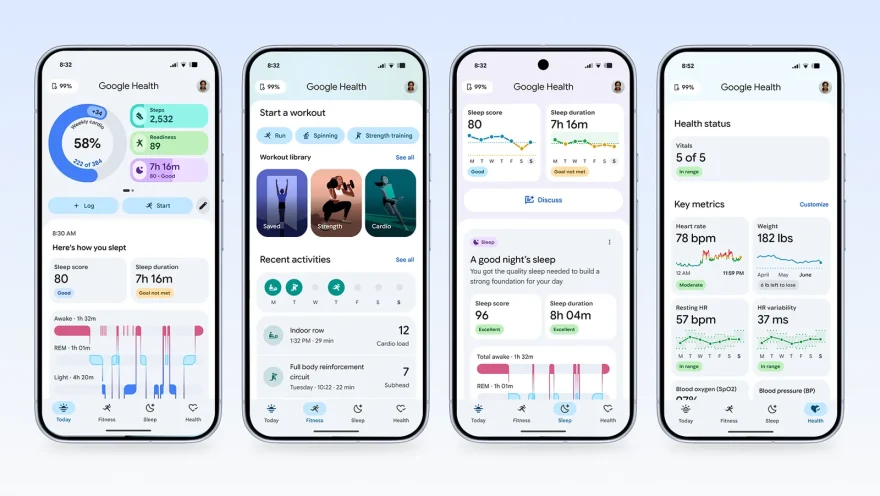
The new Google Health app unlocks a lot of options in one place, and it’s by far the most used app on my watch. I can track my sleep quality, steps, cardio load, and on the phone app, I can also now track my meals.
The Pixel watch automatically tracks most activities, like walking and running, but from the watch I can also track swimming, canoeing, hiking, and way more. If I didn’t log the activity when I started, the watch tracks what I’m doing and then a few minutes later the app suggests the activity that it recognizes. You can accept that, or change it, and then review the log for heart rate, distance travelled, and more.
That gives me a lot more information about whether I’m being active enough, and alongside my meal log–and other manual details that I add to the Google Health app–it gives me a better picture of how I’m doing day-to-day. Since I’ve been trying to lose a little weight, it’s been the most helpful thing, especially considering that a lot of health apps don’t track diet.
To some degree, it’s easy to see this as the gamefication of healthy habits, which is frankly a fun way of motivating yourself, but it’s also a more complete picture for anyone who wants to eat better, exercise more, and stay on top of their health.
Features for on-the-go
The Pixel Watch 4 pairs with my Pixel 10 Pro XL perfectly, and that unlocks a number of benefits. Of course it’s worth saying that the watch pairs well with any Android, but Pixel users definitely have one key benefit.
If you’ve ever struggled with group photos, the Pixel Watch can pair with your phone’s camera so you won’t miss the shot. Just setup your phone and aim it at your group, get in position and open the app, and you’ll see the scene on your watch. One tap on your phone, and you can capture every smile.
Music is another feature that I love on my watch, since I can control what I’m listening to on my phone. I routinely start playing things on my phone, and then control the music from my watch as I walk or hike. However you can also start listening to music from the Pixel Watch; the Spotify and YouTube Music watch apps let you open up your playlist and find the perfect soundtrack for the day.
You can also map directions from the watch, make calls, record audio, run an ECG test, check the UV index, create notes, and use Google Wallet for payments.
Durability
I’ve been wearing smart watches for years, and they have come a long way, and with the Pixel Watch 4, I have to praise both the design and durability.
The watch has a domed display, making it a little curved across the edges, and it makes the whole display a little larger, without minimal bezels. But the display is also a lot brighter, making it easier to see in all kinds of lighting conditions. Plus, that bright display means it also doubles as a decent little light when you need it.
Most importantly though, the watch features edge-to-edge Corning Gorilla Glass for excellent scratch and damage resistance, the watch band is strong and pliable, and for swimmers, the watch is IP68 rated, rated for depths up to 50 m underwater.
I’m looking forward to seeing what Google delivers next, but this is an excellent watch, and it’s a great buy compared to other brands and even compared to the newest and the latest releases.


Images courtesy of Google.