

After nearly a year of 100% incorrect rumor mill posts, Garmin Cirqa is finally here. About the only thing the rumors managed to get correct is the obvious: a screenless wearable. But the reality is, there’s little to be surprised by here with Garmin Cirqa. After all, they’d been laying this groundwork now for years, and more intensely in the last year. That included things like the screenless Garmin Index Sleep monitor last summer, which worked just fine as a screenless wearable 24×7 too.
The Garmin Cirqa comes in at $199, and has essentially every health/fitness tracking feature of any of Garmin’s sub-$500 GPS watches…just without a screen. And, without any required subscription cost. While you can certainly add Garmin Connect+, there’s little reason to for most users. More on that later down below.
Garmin has essentially delivered exactly what everyone has asked for, both in terms of features, as well as in terms of the no-subscription aspect. Obviously, there will be debates about the price being higher than Amazfit/Fitbit, but I’ll tackle that later. And in fact, they delivered one thing people didn’t expect: A button. Or more specifically, a button that actually has a number of functions. So we’ll dive into the hardware, the software/app, and everything in between. I’ll also have separate posts/videos with detailed comparisons to all the other screen-less wearables, which I’ve been wearing 24×7 since each of them has come out.
This post isn’t a full in-depth review; that’ll come shortly with a bit more details on accuracy, reliability of automatic workout tracking, and more.
Note that Garmin sent over a media loaner unit to poke at. As always, I don’t take any money from any companies I review, and I go out and buy my own units after launch, with media loaner units eventually making their way back across the pond to Garmin. Further, everything here is written by me, a real human. There’s no AI slop here (or any AI content). You can help support the site by becoming a DCR Supporter, which gets you ad-free access and a behind-the-scenes video series.
The Key Specs:

The Garmin Cirqa essentially has all the same health/wellness tracking features as any other recent Garmin watch (except ECG), so if you’re familiar with those features, then the answer is essentially ‘yes ’ to all of them. The key difference here to other watches is obviously the lack of a display/screen.
Price: $199USD/€199/£179/CAN$279
Battery Life: 10 days claimed
Weight: 20g
Sizing: Each color is offered in two sizes: Small/Medium, and Large/XL
Colors: 4 colorways, seen below, Black, Grey, Red/Pink, Navy Blue
Biceps Band Option: Yes (two sizes), $59 (or, $209 total with Cirqa pod if bought on Garmin’s site, instead of regular band)
Button: Yes, for manually starting activities, snooze, HR broadcasting, and more.
Daily Steps & Activity Tracking: Yes
Calorie Tracking: Yes
Sleep Tracking: Yes, including sleep phases/stages
Nap Detection: Yes
Smart Wake Alarm: Yes
HRV Tracking: Yes
Skin Temperature Tracking: Yes (nightly)
SpO2 Tracking: Yes
Respiration Rate: Yes
Stress Tracking: Yes
Women’s Cycle Tracking: Yes
Journaling/Logging: Yes
Health Status: Yes
Nacho Cheese Dispenser: No, due to size, this can only do parmesan sprinkles
Heart Rate Broadcasting: Yes (ANT+ & Bluetooth Smart)
Automatic Workout Tracking: Yes
Automatic Sport Detection: Yes, limited sports
Automatic Rep Counting: Yes
Manual Workouts: Yes, via button/app, 80+ workout types
Structured Workouts: Only with Garmin Connect+
GPS: Not in unit, with app as Connected GPS
Altimeter/Barometer: Not in unit, thus, no stair counting
Intensity Minutes: Yes
VO2Max Estimates: Yes
Live GPS Tracking During A Workout: Yes with app, sharable to friends/family
Combines data with other Garmin devices via App: Yes, Unified Training Status/Physio TrueUp
Training Readiness: Yes
Acute Load (Training Load): Yes, including Load Ratio & Load Focus
Recovery Time: Yes
Training Effect: Yes, including Primary Benefit, Workout Benefit
And lastly, here’s a look at all the color options you’ve got (plus more color options as standalone bands):

Got all that? There’s a bunch of other more minor features under/tied to some of the above, things like Sleep Coach & Sleep Alignment features, or the app-based Jetlag Advisor. But the above is the core of it all. So instead, let’s take a closer look at the hardware.
The Hardware:
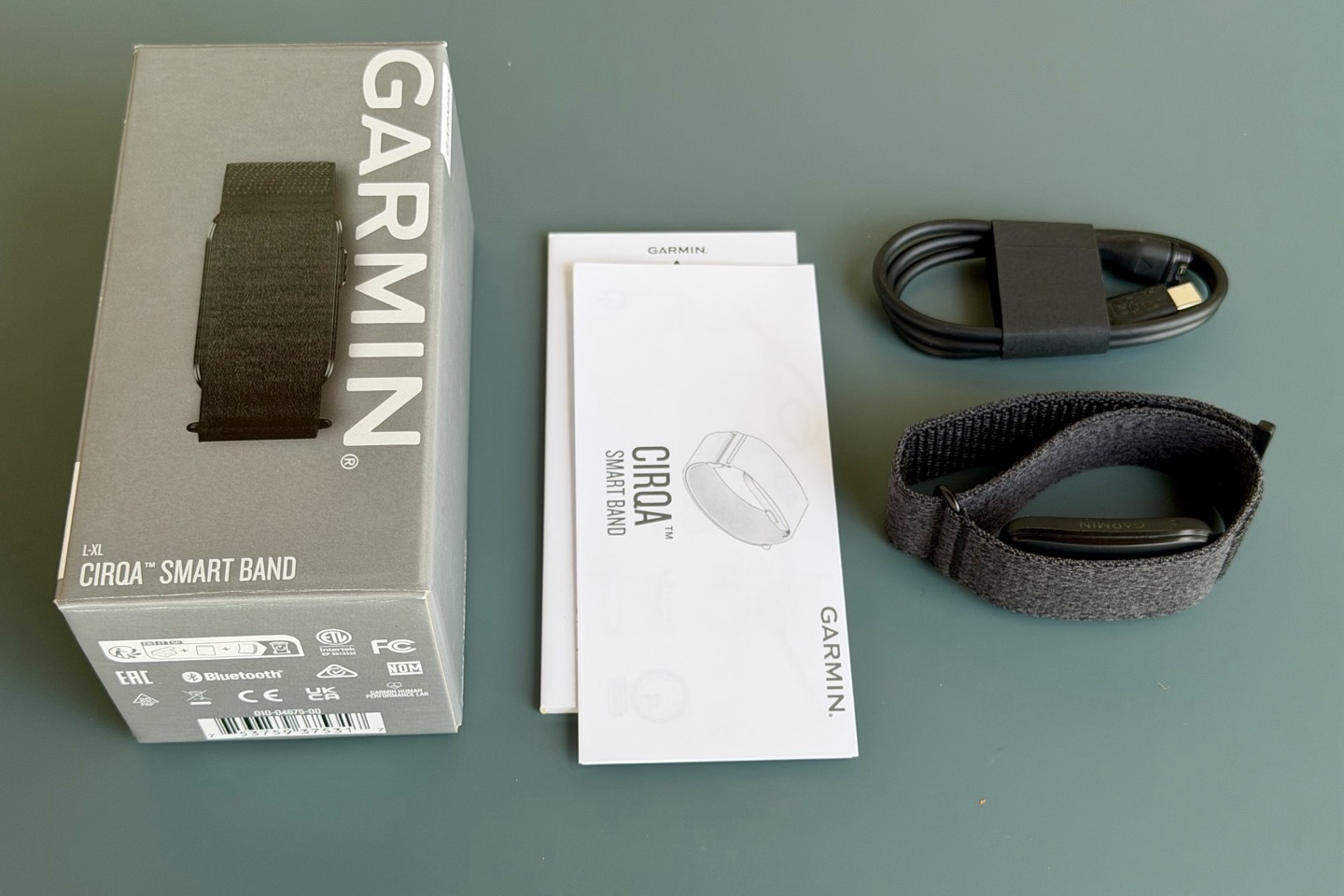
First up, let’s look at the hardware itself. The band measures 27mm across, thus a touch bit wider than the Whoop 5.0 band, and comes in four colors as noted above:

The band covers up the pod that sits below the strap, which contains the sensor, of course, as well as the button on the side.

You can adjust the tightness of the strap by undoing the velcro and then simply loosening it. Complicated this is not.

The button allows you to start a workout manually, though again, it’ll do that automatically as well. This just ensures it catches the start of the workout, useful for activities that may be hard to detect initially (such as yoga, or even a walk). It can also be used to snooze an alarm.

The pod portion is detachable, allowing you to swap it to different bands. You can do this using the quick release mechanism:

The pod uses Garmin’s Elevate Gen4 optical heart rate sensor, which is their older module (Gen5 is the latest, found on their higher-end Fenix & Forerunner watches). The key difference between Gen4 and Gen5 is the inclusion of medically certified ECG on most Gen5 watches. Gen5 also has better accuracy in certain edge cases (e.g., running downhill on a cool day). In most cases, the accuracy difference between Gen4 and Gen5 is pretty minor (if anything). For non-workout usage, it’s totally negligible.

While much ink will be spilled about Gen4 vs Gen5 here, I don’t really think it’s that big of an issue. At this price point, Gen5 would have only given ECG (medical-grade Afib detection), which, while useful to some, Garmin seems to believe isn’t really that applicable to most. I somewhat agree there. The key thing that’s in Cirqa that has historically been tied to Gen5, is skin temperature. Garmin started including that a while back in other Gen4 watches, so that’s no longer a hardware gap.
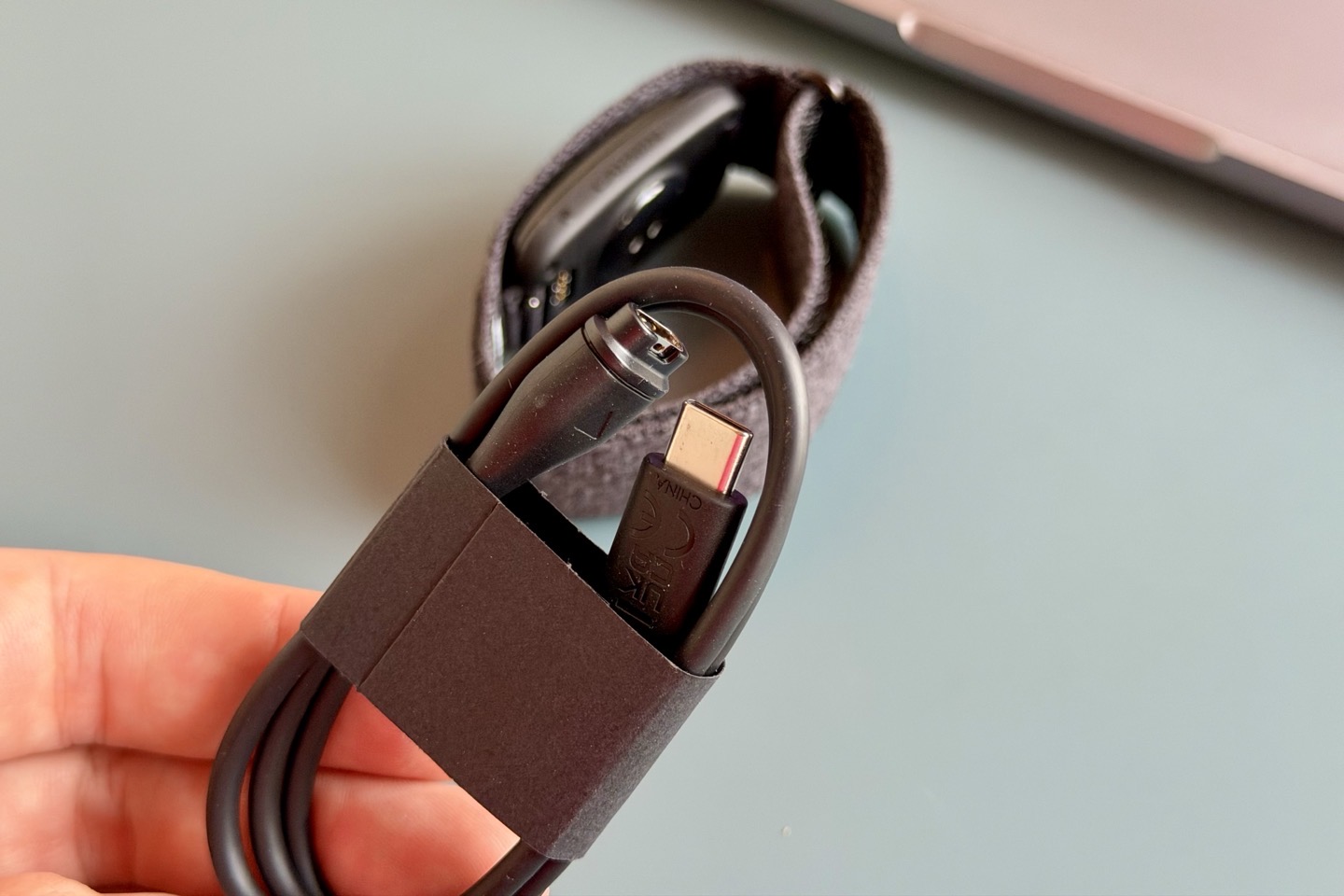
In terms of charging, Garmin claims 10 days of battery life and uses the same proprietary Garmin charging port as other watches. The other end of that cable is USB-C:
Here’s how it compares side-by-side with the Whoop 5.0/MG and Fitbit Air:

Then how it looks on my wrist (17cm, 6.5″):

Now, with the hardware covered, let’s move to the most important part here, the software app. As with all screenless trackers, the app is really what matters.
General Daily Usage & Metrics:

The Garmin Cirqa device will largely act just like any other Garmin watch in terms of all the metrics it’ll pull in. Meaning that if you’re familiar with daily/24×7 wear/usage of a Garmin wearable from any point in the last few years, it’ll be the exact same here. The only differences come in the workout section. Thus, if this isn’t your first Garmin rodeo, you can probably skip ahead to that section.
In this case, I’m going to show it to you without a Garmin Connect+ subscription, so everything you see here is included. Because I have a Garmin watch, the data shown will be a blend of underlying Cirqa data and Fenix data. But everything here is included in Cirqa.
First up, you’ve got your dashboard. There’s a new ‘Essentials’ tile section that you can enable at the top, which shows you your…well…essential items. This update is available now to all Garmin Connect users (More > Settings > Home Settings > Essentials). This is lightly customizable, up to four pieces:


Below that, you’ve got your ‘In Focus’ dashboard. In my case, that’s Training Readiness, plus some other tiles to the right, all of which are customizable.
Then, below that, I’ve got all the ‘At a Glance’ bits, which are again customizable. Each of these are clickable to more details. This includes heart rate, body battery, sleep score, RHV status, and plenty more:

If we were to click on Body Battery or Heart Rate, for example, we can see details of my day thus far (including stress tracking and activity overlays). Additionally, all of these have changeable timeframes (e.g., 7-days/4-weeks/1-year).


The same is true for sleep stats, which will pull in your sleep data, including Sleep times/score, HRV trending, SpO2 (PulseOx), and more.


Further, there are sleep coaching insights, as found on other recent Garmin wearables, including Sleep Coach and Sleep alignment:


Speaking of sleep, you can configure sleep alarms in the Garmin Connect app, both standard alarms and smart-wake alarms. Smart-wake alarms will attempt to look at your sleep phases/stages, and wake you up slightly before your actual alarm time, in a sleep stage that hurts less.


And that button on the side? It acts as a snooze button. Or, if you long-hold it, it’ll turn off the alarm entirely.
Next on the data front, there’s the Health Status dashboard, which has your key vitals (mostly overnight) that show against your specific trended history (meaning, whether they are high/low/normal relative to your baseline):


Further, as you’d expect, you can see my steps for the day here, which shows a relatively calm morning, and then I went out for a 5KM run in early afternoon, which spiked my steps. And of course, I can trend that over longer time periods as well.


I’ll add in more data snippets in my in-depth review, but that’s just a quick look at those core stats.
When it comes to the device settings, there are nearly all the same options you’d find on a Garmin watch, such as alerts, alarms, user profile, etc…


Notably at the bottom there’s the ‘Find My Band’ option, which will show you the last place the band was connected to your phone. If you tap the ‘Find My Band’ button, it’ll start vibrating the band. Obviously this isn’t an audible beeper, but if it’s in a quiet room you should be able to find it. Finally, note that you can double-tap the unit to see your battery status, using the small LED light.
With that, let’s dive into workouts.
Workout Usage:

The Garmin Cirqa band will track your workouts automatically, or manually. When in a workout mode, it can also pair to your phone to get additional data, including GPS (useful not only for plotting your GPS track, but also for speed/distance/etc. in cycling).
When it comes to tracking that workout, there are essentially three core ways it can happen:
– Automatically: By default, if you do nothing, it’ll create an activity for you automatically and attempt to classify (detecting the sport type).
– Manually via the button: In this case, it tells Cirqa that you’re starting a workout and that you want to start tracking. This is useful for sports that don’t have clear signals (e.g., yoga) that you’re starting a workout.
– Manually via the Garmin Connect app: In this case, you not only start the workout manually, but do so specifying an exact sport as well, from 80+ sports. Further, there are app dashboards to see some of your metrics in real time.
So, starting off with a simple auto-detect activity, I went for a 5KM relatively intense trail run. Out into the midday heat and back.

My other Garmin watches synced the activity, but unfortunately, nothing from Cirqa. After an hour, nothing appeared. [Update: Garmin says that if another Garmin device is used where a manual recording is made, be it Garmin watch, Garmin bike computer, etc… it’s going to defer to the manual recording from those activities and basically disappear the Cirqa activity. This makes total sense from a user standpoint to minimize clutter.]
Thinking that perhaps it was tied to the other Garmin watches pushing activities, I went out for another short few-kilometer run, this time with connectivity turned off on the watches, and no phone. This time it did create an automatically detected activity, though it took about 15-20 minutes after the run to show up. It’ll basically push a notification to your phone that an activity has been detected, and then ask you to confirm the activity type (it was correct).


This is different from Whoop (and Fitbit), which just ‘own’ the decision and mark it as a run and call it done. I kinda wish Garmin would be a bit more ‘automatic’ here. [Update: Garmin says that over time, it’ll become more ‘confident’, and simply start auto-confirming those activities by itself.]
In any case, it seemed to start a bit too early while I was walking to my starting point, and it actually picked up my phone that I had left behind on the way out. In any case, there are stats here:


Now, Garmin has the option to trim the stats to remove the start/end bits that aren’t correct, but sadly, that didn’t work. I tried a few more times, without luck. Again, for a screenless wearable, this is a key feature that *has* to work. [Update: Garmin says a backend update pushing Wednesday, July 22nd, will fix this issue.]


Speaking of things that didn’t work, I somehow went from a training readiness of 73 (prior to my first run), down to 50 (after my first run), and then back up to 73 (after my 2nd run + a ride). And then 15 minutes after that, went back down to 54. So…yeah, something isn’t working there either. [Update: Garmin says this is a known issue they are working to address, but don’t have a time/fix estimate yet.]
Next, when it comes to a manually started workout via the button, you can configure what exactly happens when you press that button. First, it’ll always start a certain type of activity. That could be Running, or Yoga, or Strength. Or, you can just make a generic timed activity. Further, you can specify whether to leverage your phone’s GPS when the button is pressed, as well as specify any alerts (which is currently just AutoLap by distance, and a time-based alert). Further, you can define whether it’s on the wrist, or an armband:


When you press that button on the side, it’ll automatically start recording an activity, and give you a notification on your phone. Here, you can open up a tab that shows you incredibly limited information, as seen below:


There’s no way to customize this, or expand it. If you subscribe to Garmin Connect+, you also get a heart rate graph. Let me be clear: This is astonishingly disappointing. Amazfit, at $99, gives you a fully customizable live stats dashboard, complete with maps, charts, and more. Whoop does the same. Polar does the same (at $199), and Fitbit, while at $99, has admitted their first release of the live activity page needs a revamp and has committed to working on improving it.
I have no problem with Garmin upselling you on Garmin Connect+ to provide additional features. But this simply shouldn’t be an upsell feature. This is basic dial tone stuff that’s been in apps for 15 years. And even if I did subscribe to GC+, it still wouldn’t show maps or customizable data pages. But again, how on earth does a heart rate band not show me my actual current heart rate? Are you kidding me?!? C’mon.
In any case, when you’re done with the activity, you can press the button to save/end it. Or, you can use the smartphone to end it.
Lastly, on the workout starting piece, there’s the manual start with the Garmin Connect app. In this case, I started a simple workout while cycling to the grocery store to get garbage bags (seriously), with a bit extra for fun. This is useful here because I’m able to leverage GPS for the route (and distance), while the Cirqa provides the heart rate metrics. But again, same very thin information during the activity as above.
You’ll press the + at the top to start a workout manually, choose the workout type, and then press start:


During the activity, you’ll see the same stats as the previous section. Again, no actual live heart rate.
Then you can see the summary stats of the workout afterward. Obviously, had this been a normal cycling workout, I’d have much more impressive stats. But, you can get the gist of things from a quick loop around to get some garbage bags.


In my full in-depth review, I’ll go into how well it recognizes cycling from an automatic detection standpoint, especially for commuting, where the more casual start/stops can cause some automatic detection algorithm challenges. And of course, detailed heart rate accuracy charts/etc…
Now somewhat surprisingly, none of my workouts have synced to 3rd-party apps such as Strava, TrainingPeaks, etc… Which…umm…is very surprising. [Update: Garmin says this is because they hadn’t toggled a backend switch yet to send workouts from Cirqa to 3rd-party platforms. That toggle has now been flipped, and I can confirm that as of the morning of July 22nd, my bike commute showed up on Strava/etc…]
Meanwhile, the button has a handy feature during workouts that’s worthwhile mentioning: Turning on heart rate broadcasting. You can long-hold it for two seconds, and it’ll start broadcasting your heart rate to 3rd-party apps/platforms (e.g., Zwift, Peloton, etc…), or things like a Garmin bike computer. The small LED on the side will flash yellow/orange when it’s doing so. Here you can see it in Zwift:

(Note: You need to enable this in Settings > Health & Wellness > Broadcast Heart Rate > Device Control & Status toggles)
Now, one workout-specific feature that’s unique to Garmin Connect+ is the ability to iterate through a structured workout on the app. This piece requires Connect+, regardless of whether it’s a Garmin Coach workout, or one that you created.


In any case, after your workouts (any workouts, of any type, structured or otherwise), you’ve got additional data as it relates to training load and training status. Training Load (specifically, Acute Load) will show load as it relates to your baseline over time. While Training Status will show the usual Productive, Unproductive, Maintaining, Recovery, etc… Acute Load includes aspects like Load Ratio and Load Focus. In my case, I’ve been doing lots of summer water things that aren’t really high-heart-rate activities (stand-up paddle boarding, eFoiling, etc.) that have me with a reasonably low training load the last few weeks.


Whereas Recovery will show up in both the activity itself (the recovery time needed from that activity), as well as overall Recovery time needed until your next hard workout, and can be seen in Training Readiness.
Finally, there’s Garmin’s Training Readiness feature. This is Garmin’s umbrella metric that looks at your training load (Acute Load), Sleep (last night, and recent nights), Recovery Time, Stress, and HRV status, and gives you an overall score. This score shifts throughout the day, usually starting off in the morning and declining if you’ve had a busy day, or increasing slightly for an easy day. Stress moments will drop the score down, as will workouts. You can see my score this morning:


Whereas before my run this afternoon it had slowly climbed to 73, and then after my run it dropped down to 50, due to the recovery need pushing the score down. The problem is, Garmin isn’t updating the second chart throughout the day, but does update it in Essentials.
Generally speaking, Training Readiness is one of the best things that Garmin has designed, mostly in the footsteps of what Fitbit did with Daily Readiness Scores years ago (now just called Readiness). It’s a key leg-up over Whoop, especially, which lacks any sort of continually updating score. In Whoop’s case, you have a Strain Score (effectively Training Load for the day), and then a point-in-time Recovery score in the morning. But that score doesn’t update over the course of the day (either up or down). Garmin needs to update their user interface to correctly show the value consistently across all parts.
Again, Training Readiness, along with all the components that go into it, is a key competitive advantage that Garmin has here. While Whoop has their own advantages (such as more accessory options, and better automatic workout type detection), the Training Readiness is hard to overstate. Especially if your goal is to have that type of guidance that so many people with screenless wearables want.
Finally, when it comes to your data and mixing it with other Garmin wearables, it all syncs in, just like any other Garmin watch. So you can use Cirqa 24×7, or just a portion of the data. The data will update accordingly on your other devices. For example, during this run, I took off my Fenix 8 Pro, and instead wore the Cirqa on one wrist, and then a Forerunner 170 on the other wrist. At the end of the day, the Fenix 8 Pro updated its stats accordingly with the Cirqa data (including steps, training load, etc…).
What Does Garmin Connect+ Subscription Add?

In short, very little. And more specifically, very little beyond what is already there over the last year.
As noted above, Connect+ isn’t required for the device, and instead, is only giving you a handful of extra features, mostly around coaching and nutrition tracking. Most of the coaching features seen here are usually free on Garmin’s watches with screens, but here they leverage the Garmin Connect app as your screen, and thus decide to charge you for it.
Here’s what Garmin Connect+ would add:
– Garmin Coach Workouts in app: Strength & Fitness specifically
– Additional Structured Workouts in app: Cardio, Yoga, HIIT, Strength, Pilates, Wheelchair
– Nutrition Tracking: Launched earlier this year.
– Manual Lap Creation: Via the Garmin Connect app during Live Activities
– HR graph in the app: For Live activities, it adds the heart rate chart/graph at the top
– Garmin Active Intelligence (AI) Insights: Very short couple-line snippets in the app dashboard
– Performance Dashboard (Web): Basically can create your own dashboard on the web
– Garmin Trails: Curated trail routes, not really applicable to Cirqa
– Enhanced LiveTrack Location Sharing: This will text (instead of e-mail, which is free), as well as a dedicated LiveTrack page
– 3D Maps in app: Again, for workouts with GPS only
– Discounts on Garmin accessories: Via app, very limited selection
– Extra Garmin Social Badges: Again, via app
– Annual Roundup of Activity Stats: At end of year, ‘Garmin Connect Rundown’ slideshow
As you can see, many of the features aren’t super applicable to Cirqa. Accessory discounts are things like Garmin cycling sensors (not applicable here), and Edge bike cases. There are also discounts on heart rate straps, but there’s an HR sensor here, and most of the time Amazon is still cheaper than the Garmin.com discount anyway.
I think the most notable feature here is just how limiting the live activity view is (on the mobile app) without GC+, but frankly, GC+ only adds the live HR graph metric, which is pretty limiting.
Instead, the most applicable Garmin Connect+ feature here is the Garmin Coach Workouts in the app, and then the manual lap creation. The Garmin Coach Strength workouts have been behind the Garmin Connect paywall since they were introduced. But here on Cirqa, any structured workouts require Garmin Connect+. But the lack of being able to do your own structured workouts without GC+, is pretty weird.
Meanwhile, aspects like nutrition tracking are very real, and if you were previously paying for some other nutrition tracking platform, this will generally be about the same price as that, plus you get all the extra bits outlined above. You can check out my full Garmin Connect+ nutrition post here, as well as my full Garmin Connect+ features rundown here.
A Quick Market Comparison:

(Above left to right: Fitbit Air, Garmin Cirqa, Whoop 5.0/MG, Amazfit Helio)
Next, here’s a not-so-short chart I’ve put together comparing how Garmin’s offering competes with others on the market today. I’ll continue to expand this, and do a full dedicated post with more analysis, but here’s the gist of it for now with the core metrics:

Again, I’ll dive into things more deeply in the coming days, from a comparison standpoint.
FAQ’s:

Here’s a quick listing of all the most common questions you’re probably going to ask, as well as any others I’m seeing asked a fair bit, I’ll include here.
1) Does Garmin Cirqa require any subscription?
No, it does not. While you can subscribe to Garmin Connect+ to get added features outlined above, there’s no core feature that requires it. The only feature that’s really applicable here would be the Nutrition tracing function released earlier this year. But for context, I don’t subscribe to Garmin Connect+, and don’t feel like I’m missing anything. All of the features it has without a subscription are more than competitive enough to Whoop & Fitbit.
2) What’s the battery claim?
Garmin claims 10 days of battery life
Yes, one button to start/stop an activity manually. You can also just use automatic workout detection. Further, the button acts as a snooze button for alarms, can start heart rate broadcasting (by long-press), and can silence the vibration motor (alarm) if you used the Find My Garmin feature. Also, it’s used for initial pairing.
4) Does it have a screen, or any display/LED?
No, it does not have a screen of any type. It does, however, have a small pairing LED on the device, like others from Whoop, Fitbit, and more.
5) Does it have vibration alerts?
Yes, it has vibration alerts to be used as a sleep alarm.
Yes, it can (and will) automatically track workouts. This is grouped into basically two groups. The first is that for certain sport types (like a run/walk) it’ll create a run/walk workout in your workout log. For other types that it’s unsure of, it’ll still log the workout, and then you can manually assign the sport type. Additionally, you can always manually log a workout with the Garmin Connect App leveraging the Cirqa band, from those 80+ sport types.
7) Does it show Acute Load (Training Load)?
Yes, it records Acute Load, Load Ratio, and Load Focus. Basically, at the exact same Training Load status as any high-end Garmin Watch (even a Fenix 8 Pro).
8) Will those workouts sync to Strava and other platforms?
Yes, it’ll automatically send them to 3rd-party platforms, if you’ve configured it.
9) Does Garmin Cirqa Support ECG?
No, it does not have the correct sensor or internal wiring to do medical-grade ECG or Afib detection. That’s part of Garmin’s Elevate Gen5 optical HR sensor, and this contains a Gen4 optical HR sensor. While Garmin has some much older watches (the Venu 2 Plus) that did ECG on Gen4, that required additional internal wiring and isolation rings.
10) Does it monitor skin temperature?
Yes, it’ll monitor skin temperature at night. That’s mostly useful for female cycle tracking (predictions); for other scenarios, it doesn’t really tend to be all that useful because skin temperature monitoring at night is far more impacted by things like the room temperature.
11) Does it monitor your heart rate 24×7?
Yes, like all Garmin wearables, it monitors and records your heart rate 24×7. You can view that within the Garmin Connect app (both on the mobile app and on the website).
12) Does it have high heart rate alerts?
Yes, you can configure high/low abnormal heart rate alerts, for times outside of workouts.
13) Does it measure SpO2 (PulseOx)?
Yes, it measures PulseOx at night automatically. Further, you can do a one-off measurement at any time using the Garmin Connect app.
14) Does Cirqa measure Respiration Rate?
Yes, like other Garmin wearables, it’ll measure this at night and trend it over time. Additionally, it’ll measure this during a workout.
15) Does it have the Health Status feature/dashboard?
Yes, it does. Health Status isn’t technically a new feature per se, but rather, just collecting data points Garmin has long collected (many years), and putting them in a single dashboard and trending them. There are more details here.
16) Does it have journaling?
Yes, Garmin has journaling included (for free), since about a year ago. Details here.
17) Does it track steps?
Yes, it’ll track steps, as well as intensity minutes, and of course calories.
18) Is it waterproof?
Yes, it’s waterproof to 50m.
19) Does it have GPS?
No, it does not have GPS inside it, but it can use the Garmin Connect app with your phone to record a GPS track of your activity. Thus, you can use the heart rate portion from Garmin Cirqa, and then use your phone for the GPS track to get distance, speed, pace, and other metrics (seen on Garmin Connect mobile).
20) Does it have WiFi?
No, it does not have WiFi. WiFi would burn far too much battery here. It has Bluetooth and USB via the Garmin standard proprietary USB charging port. You can sync via Garmin Express on desktop as well.
21) Does it broadcast your heart rate to other apps/devices?
Yes, it broadcasts on standard ANT+ & Bluetooth Smart to any 3rd party device/app.
22) Does it connect to ANT+ or Bluetooth sensors like power/cadence/etc…?
No, neither the Cirqa device nor the Garmin Connect app will connect to these sensors from a data workout standpoint.
23) If I wear Cirqa and a Garmin watch at the same time during a workout, what happens?
The way it works is that if you record a manual activity on any Garmin device while Cirqa is worn, then the manually recorded activity will take priority, and disappear the Cirqa activity (if the other device’s manual one syncs first). However, if Cirqa syncs first, and you confirm that auto-detect activity (meaning, change it from ‘Maybe’ an activity to ‘Definitely’), then any other Garmin manually recorded activities during that timeframe will stay (just how it works today when recording on two Garmin devices at once). This is true for Garmin watches, as well as Garmin Edge devices.
Beyond that, for non-workout aspects, if you wear a Garmin watch + Cirqa, then it defaults to which device is set as the Primary Device in your settings.
24) If I switch back and forth between Cirqa and a Garmin watch, will my steps/etc be updated?
Yes, you should have full true-up of data, including steps, Body Battery, HRV Status, Stress, Training Status, training load metrics, Sleep data, sleep scores, etc…. Basically everything will sync seamlessly.
25) Is the bicep band simply a longer regular strap?
No, the bicep band has a substantially different and more elastic material on it than the regular strap. This is common for other companies like Whoop/etc, where you want the bicep band to have more ‘give’ than a regular watch strap.
—
I’ll keep rounding up the most frequent questions and sticking them here.
Wrap-Up:

So is this a ‘Whoop Killer’? Or a ‘Fitbit Killer’? Nah. Again, that’s just clickbait. Instead, it’s going to undercut both of those, but in different ways. This hurts Whoop more than it hurts Fitbit. In the case of Fitbit, it’s still missing some elements that target the hardcore athlete, such as better tracking data during a workout, a clear-cut user interface for data analytics, and deeper journaling. Whereas Garmin, they easily outclass Whoop on both the deeper data analytics side. The journaling isn’t quite as deep out of the box as Whoop’s, but you can also customize it to fill those gaps, so for most, it’s probably good enough. Where Garmin does lag behind Whoop is the simplicity of Whoop’s Strain/Recovery dashboard. Garmin has the exact same data (Acute Load, Training Readiness), but again, many people argue the way Whoop enumerates that data is cleaner. Further, Whoop’s accessory line is *far* deeper than Garmin’s (ironic, because that’s historically an area that Garmin has excelled at for other product lines, but seemingly dropped the ball here).
But having a ‘killer’ product is rarely about the best technical product. It’s also marketing. And both Whoop and Fitbit are immeasurably better at product marketing than Garmin is, especially when it comes to celebrities and influencers. Fitbit went deep in this area for the Fitbit Air launch, and as a result, the response has been borderline record-breaking. Equally, Whoop has a long history of doing the same across both celebrities and influencers (however you want to define that). While neither of those might appeal to the hardcore DC Rainmaker follower focused on data and science, the reality is they substantially move the needle. And Garmin simply doesn’t meaningfully engage with either.
Instead, I think the first step that Garmin has done here is to effectively stop the bleeding. Not just to Fitbit and Whoop, but also to Amazfit. With Amazfit priced at $99, for folks wanting a holistic watch+band solution, they were really the only other serious option (yes, Polar has a watch+band offering, but…). With Garmin’s offering on the table, they can be part of the competitive conversation when people are looking at any of these. With Garmin’s product, you pay once for $199, that’s it. Sure, there’s Connect+, but it’s hardly required. As a fun tidbit: My Connect+ subscription lapsed back in April, and there’s not been a single moment I missed it. For my needs (which are pretty darn data-heavy, mind you), it simply doesn’t provide anything. Perhaps Garmin can change that down the road, but for now, nah. That said, kudos to Garmin on sticking the landing on offering a biceps band at launch.
In that context, Garmin Cirqa is absolutely going to steal a number of purchases from Whoop. And not just purchases, but renewals. A single year of the cheapest Whoop device is equal to a lifetime of Garmin Cirqa. Thus, Garmin will take many of the more athletic-focused purchases, whereas Fitbit and Amazfit will take from Whoop many more of the budget-focused mainstream consumers. Where Garmin needs to think out of the box is how to convert those Fitbit purchasers to Garmin. Which, ultimately, gets back to marketing (starting with retailers, and all the way up from there). Garmin has solved the product problem; now they need to think about how they market it.
In any case, plenty more to come in the following days and weeks, so stay tuned!
With that, thanks for reading!
Found This Post Useful? Support The Site!
Hopefully you found this review/post useful. At the end of the day, I’m an athlete just like you looking for the most detail possible on a new purchase – so my review is written from the standpoint of how I used the device. The reviews generally take a lot of hours to put together, so it’s a fair bit of work (and labor of love). As you probably noticed by looking below, I also take time to answer all the questions posted in the comments – and there’s quite a bit of detail in there as well.
If you’re shopping for the Garmin Cirqa (Black) or any other accessory items, please consider using the affiliate links below! As an Amazon Associate I earn from qualifying purchases. It doesn’t cost you anything extra, but your purchases help support this website a lot.

Here’s a few other variants or sibling products that are worth considering:
And of course – you can always sign-up to be a DCR Supporter! That gets you an ad-free DCR, access to the DCR Shed Talkin’ video series packed with behind the scenes tidbits…and it also makes you awesome. And being awesome is what it’s all about!
Thanks for reading! And as always, feel free to post comments or questions in the comments section below, I’ll be happy to try and answer them as quickly as possible. And lastly, if you felt this review was useful – I always appreciate feedback in the comments below. Thanks!