
Low-code platforms such as Microsoft Power Platform and Microsoft Copilot Studio help our employees build apps, automate routine work, connect to services, and create AI agents without using traditional software development. It’s a big part of our move toward becoming a Frontier Firm.
Our Microsoft corporate tenant now contains hundreds of thousands of low-code agents and other resources that touch company data, creating more risk for us to manage. Apps shared too broadly can expose information, and ownerless workflows can leave resources unmanaged.
Microsoft Digital, the company’s IT organization, and the Microsoft Office of the CISO have responded to this risk by establishing individually owned developer environments where our makers—the employees who build apps, workflows, and AI agents using low-code tools—can do their work.

“We constantly hear from customers that they fear their data is at risk, so they try to hide the data from these new agentic capabilities. At Microsoft, we believe the answer is not to hide data, but to govern and protect it with appropriate access restrictions so it can be safely used by authorized people and AI capabilities.”
Naveen Jangir, principal architect, Microsoft Digital
Instead of building in one shared environment that anyone in the company could access, makers now operate in a personal workspace that is individually owned. This new model establishes accountable ownership and provides a consistent place to apply governance policies and monitor resources.
Since 2024, our employees have created more than 170,000 of these workspaces, known as personal developer environments (PDEs). Each has a single owner, who is responsible for what is built there.
Some organizations attempt to keep low-code tools away from their most important data, but we took a different approach.
“We constantly hear from customers that they fear their data is at risk, so they try to hide the data from these new agentic capabilities,” says Naveen Jangir, a principal architect in Microsoft Digital. “At Microsoft, we believe the answer is not to hide data, but to govern and protect it with appropriate access restrictions so it can be safely used by authorized people and AI capabilities.”
Why a shared workspace became a risk
Every Power Platform tenant starts with a default environment, where makers land automatically and everyone in the organization has access. That made it easy to get started, but it also meant apps, flows, and connections piled up in one place, many shared too broadly or abandoned when people changed roles.

“If you can’t see it, you can’t do anything about it. With an accurate inventory, you can start to detect configurations and surface the security risks that matter.”
Mark Jacobs, principal PM manager, Office of the CISO
Stale resources, overly broad sharing, and poorly governed connections can create unintended paths to sensitive company information. But first we had to figure out just what was being exposed.
“If you can’t see it, you can’t do anything about it,” says Mark Jacobs, a principal PM manager who leads low-code, no-code security efforts in the Office of the CISO. “With an accurate inventory, you can start to detect configurations and surface the security risks that matter.”
Fixing the problem took two teams working as one.
The Office of the CISO sets security requirements, including which connectors makers can use, and monitors for risky activity. Microsoft Digital manages the company’s tenant and owns governance, including how these environments are set up and who owns them. Privacy, legal, and responsible AI teams define requirements in their own areas, and Microsoft Digital works with these teams to translate applicable requirements into tenant controls and governance processes.

“The relationship between security and governance is important. We work closely with the governance teams to make sure that if there are issues we can prevent, we can shift left in the process and stop them from occurring in the first place.”
Andrew Leeland, senior security operations engineer, Office of the CISO
Andrew Leeland, a senior security operations engineer in the Office of the CISO, sees many customers keeping these functions separate, leaving security to react to problems that closer teamwork could have prevented.
“The relationship between security and governance is important,” Leeland says. “We work closely with the governance teams to make sure that if there are issues we can prevent, we can shift left in the process and stop them from occurring in the first place.”
Giving every maker a space of their own
Personal developer environments are the foundation. When employees open Copilot Studio, Power Apps, or Power Automate today, they land in their own PDE instead of the shared default one.
The basics work much like OneDrive: The workspace is individually owned rather than broadly accessible by default. Sharing is constrained, and anything built there remains subject to the maker’s existing permissions and organizational policies.
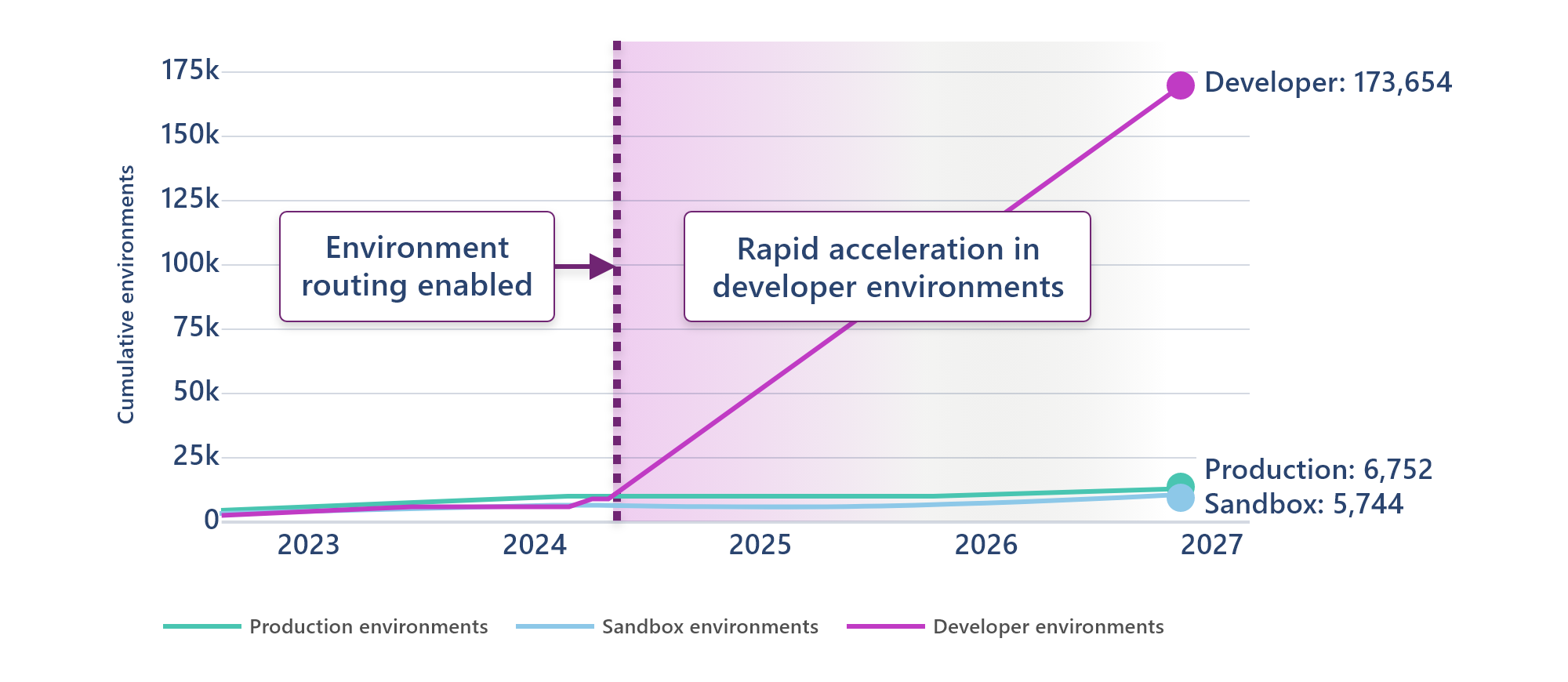 This graph shows the dramatic growth in Power Platform developer workspaces at Microsoft in recent years, rising from basically nothing in early 2024 to more than 170,000 today.
PDEs are just one of three tiers we use at Microsoft. Teams build together in sandbox environments, and solutions meant for the whole company run in production environments. Those two tiers have grown far more slowly than personal environments (see graph), which is intentional. Apps in those environments can reach more people and more data, so they must pass our security and responsible AI reviews first.
This has changed how sharing works. In the previous default environment, a maker might expose information beyond the intended audience. Now an app in a personal environment can reach only a limited number of people, until it moves into production and passes further review.
“It’s a little more difficult to share things out of your environment, but that’s by design,” Leeland says. “You shouldn’t be able to overshare too easily.”
Ownership also means accountability. PDEs are assigned to one person, so there’s a clear record of who built what. And when an employee leaves the company, lifecycle processes identify their associated environments and resources for cleanup.
Controlling what apps can connect to
Connectors are how an app or agent reaches other services, such as email, files, or a database. A single app with the wrong connector can send data somewhere it shouldn’t go, so we decide up front which connectors each type of environment can use. Those rules then apply automatically when a new environment is created.

“In Power Platform, connectors are the main vehicle that brings data in and out of the apps and agents you build. Connector policies in Power Platform, which the security team leads, are the glue that holds it together.”
Aisha Hasan, principal product manager, Microsoft Digital
In personal environments, makers can use almost any Microsoft connector, with two conditions:
The connector has to sign in with the maker’s own work account
It can’t send company data to services outside Microsoft
A personal environment does not grant its maker additional access to company data. Apps and agents built there operate within the maker’s existing permissions, while connector policies restrict how that data can move between services.
This model reduces unintended exposure and creates clear accountability, but it does not make appropriate every use of accessible data. Sensitive-data handling still depends on identity and permission controls; data governance; connector restrictions; monitoring; and—where required—security, privacy, legal, and responsible AI review.
Production and sandbox environments have more oversight, so they have fewer limits. Each one is registered to a team and tagged with the kind of data it handles; makers there can build custom connectors to reach services that aren’t on the standard list.
“In Power Platform, connectors are the main vehicle bringing data to the apps and agents you build,” says Aisha Hasan, a principal product manager for Copilot Studio and agent extensibility in Microsoft Digital. “Connector policies in Power Platform, which the security team leads, are the glue that holds it together.”
When a new connector becomes available, Microsoft Digital and the Office of the CISO review what it can do and decide whether every maker can use it, or only makers in higher-risk environments.
Up-front rules can’t stop everything, so the teams also watch the apps, workflows, and agents (or “resources”) that makers create.
When someone builds a resource in the default environment, Microsoft Sentinel flags it, alerts the maker, and suspends it so the maker can move it to the right environment. A third-party detection tool adds another source of signals. Alerts spiked when enforcement began but have tapered off. Most makers need only an alert or two before they start building in the right place from the beginning.
Bringing agents into the same model
Employees are now moving beyond apps and workflows to build AI agents in Copilot Studio that can reason through a request and act on their behalf.

“The autonomy of AI agents introduces new security risks. One of the biggest challenges is determining which agent behaviors create unacceptable risk and then putting the right policies and controls in place to block those behaviors before they cause harm.”
Prathiba Enjeti, principal PM manager, Office of the CISO
That autonomy makes agents useful, but it raises the stakes. Unlike an app, which follows predefined logic, an agent can interpret context, make decisions, and select actions dynamically, increasing risk when its access and actions aren’t properly governed.
“The autonomy of AI agents introduces new security risks,” says Prathiba Enjeti, a principal PM manager in the governance and risk team of the Office of the CISO. “One of the biggest challenges is determining which agent behaviors create unacceptable risk and then putting the right policies and controls in place to block those behaviors before they cause harm.”
In this new model, agents don’t start from scratch with access to anything and everything. Copilot Studio inherits Power Platform’s connector policies, so the environments and guardrails already in place carry over. Many agents are built on the same workflows and connections as other apps, so each one stays tied to the environment it was built in, where the team can see who owns it and what it connects to.
The team assesses agent configurations and monitors for policy violations. Environment and connector policies provide an important foundation, but agents also require controls over identity, permissions, data access, and runtime activity.

“We really want to make sure we apply basic security fundamentals and hygiene to agents. We’re always looking to make sure that the agent has been configured securely up front.”
Henry Duncan, senior security program manager, Office of the CISO
As the company’s Customer Zero, the team meets weekly with the Microsoft Defender product group to share findings and test new capabilities.
“We really want to make sure we apply basic security fundamentals and hygiene to agents,” says Henry Duncan, a senior security program manager on Enjeti’s team. “We’re always looking to make sure that the agent has been configured securely up front.”
A safe path for what comes next
Leaving the default environment behind has changed how Microsoft builds on low-code platforms. Individually owned environments reduce broad-by-default exposure and establish accountability, while connector policies, access controls, and fresher inventory govern how data is used and shared. Guardrails are in place before anything is built, and monitoring catches anything that slips through.
Our work isn’t finished.
Some product features still rely on the default environment, and agents keep introducing new risks. As agent capabilities evolve, risks will extend beyond environment configuration. With this foundation in place, employees will still have the freedom to experiment without being caught off guard.
That balance comes from the two teams’ seamless partnership.
“Governance defines the safe path,” Jangir says. “And security helps us continuously validate that the path remains safe.”
Key takeaways
Here are some principles to keep in mind if you are looking to secure low-code platforms and agents at your organization:
Run governance and security as one operating model. Let policy owners define the rules and have your platform team enforce them.
Start with an inventory and keep it fresh. You can’t secure what you can’t see. Timely data and a thorough inventory lead to better risk decisions.
Move off the default environment in parallel tracks. Pair a clear migration timeline with gradual connector restrictions, so that makers are nudged toward owned environments.
Pair proactive guardrails with reactive monitoring. Detection and a clear remediation path can catch what connector policies might miss.
Prioritize agents by risk. Build a complete agent inventory, enrich it with risk context, and prioritize the agents with the greatest exposure.
Try it out
Related links